
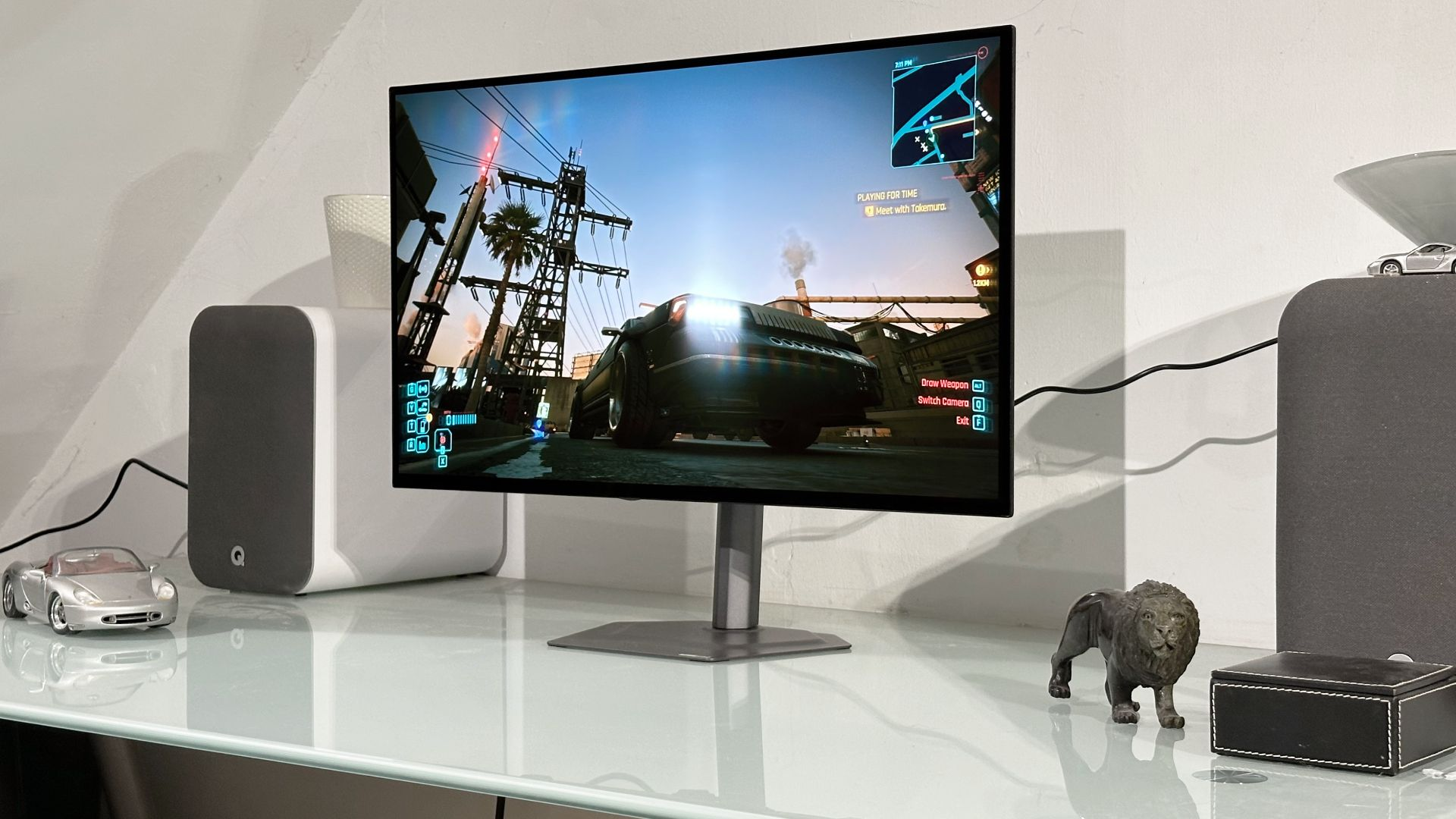
The Gigabyte GO27Q24G delivers 1440p OLED gaming at $599 - $100 cheaper than Gigabyte's premium MO27Q28GR model. This budget-friendly monitor uses an older LG WOLED panel, offering deep blacks but compromising on peak brightness.
TL;DR: For $599, the Gigabyte GO27Q24G brings OLED gaming to budget-conscious players, though its 275-nit brightness trails newer panels.
Key Takeaways
- Uses LG's WOLED panel with 240Hz refresh rate and 0.03ms response time
- Peaks at 1,300 nits in HDR (vs 1,500 nits on newer OLEDs)
- Lacks USB-A hub but includes HDMI 2.1 and DisplayPort 1.4
- Best suited for dark room gaming with HDR content
- Priced competitively against LCD alternatives like the ASUS VG27AQ
What Makes the GO27Q24G Stand Out?
Gigabyte's GO27Q24G targets gamers wanting OLED quality without premium pricing. The 27-inch display uses a 1440p resolution that balances sharpness with performance, especially for mid-range GPUs. While it shares the same 240Hz refresh rate as pricier models, its older panel technology shows in brightness limitations.
The monitor's HyperNits technology helps boost HDR performance, but can't overcome the panel's 275-nit standard brightness ceiling. In testing, this meant vibrant colors in dark scenes from games like Resident Evil 4 Remake, but washed-out visuals in bright titles like Forza Horizon 5.
How Does It Perform for Gaming?
The GO27Q24G's 240Hz refresh and near-instant response time make it excellent for competitive shooters. In Valorant, motion clarity rivaled monitors twice its price. However, the brightness limitations become apparent in sunlit Call of Duty maps, where details in shadows disappear.
HDR performance peaks at 1,300 nits in small windows - enough for highlights in space games like Starfield, but full-screen brightness struggles compared to newer OLEDs. The monitor includes six-axis color adjustment for fine-tuning, though default settings work well for most content.
What Are the Visual Trade-Offs?
OLED's infinite contrast shines in dark scenes, but the GO27Q24G's colors appear muted beside newer panels. Testing showed a 12% narrower DCI-P3 color gamut than Gigabyte's premium MO27Q28GR. The glossy coating enhances perceived contrast but reflects ambient light.
The monitor lacks built-in speakers - a common omission at this price. Gamers will need headphones or external speakers, as the only audio output is a 3.5mm jack. On the plus side, the stand offers full adjustability including 130mm height range and 90° pivot.
Who Should Buy This Monitor?
Casual gamers and OLED newcomers get the most value from the GO27Q24G. Its $599 price undercuts similar-sized OLEDs by $200-300, making it a low-risk entry point. Competitive players may prefer brighter IPS options, while HDR enthusiasts should consider saving for newer OLED models.
The monitor works best in controlled lighting. Those with bright rooms might struggle with glare from the glossy panel. For mixed-use, the adjustable stand and USB-C input make it versatile for work and play.
Final Verdict
Gigabyte's GO27Q24G brings OLED gaming to more players at $599. While brightness and color vibrancy trail newer panels, its motion clarity and contrast outperform LCD alternatives. Ideal for dark room gaming and HDR content, but competitive players may want brighter options.
Pros:
- True blacks and infinite contrast from OLED
- 240Hz refresh with excellent motion handling
- Full ergonomic adjustments
- $200+ cheaper than comparable OLEDs
Cons:
- 275-nit brightness limits daytime use
- Colors less vibrant than newer OLEDs
- No built-in speakers
- Glossy coating reflects ambient light
Frequently Asked Questions
Q: How does the Gigabyte GO27Q24G compare to other monitors in its price range?
The Gigabyte GO27Q24G stands out in the budget OLED category, priced around $100 less than its higher-end counterpart, the MO27Q28GR. However, it competes closely with other affordable monitors like the Dell S2721DGF and ASUS TUF Gaming VG27AQ, which offer similar specs but may lack OLED's deep blacks and vibrant colors [1].
Q: What are the specific brightness and HDR performance ratings of the Gigabyte GO27Q24G?
The Gigabyte GO27Q24G has a maximum brightness of 275 nits and peaks at 1,300 nits in HDR mode. This performance is lower than newer OLED panels, which can reach up to 1,500 nits, resulting in a less vibrant HDR experience compared to competitors [1].
Q: Who is the target audience for the Gigabyte GO27Q24G?
The monitor is primarily aimed at budget-conscious gamers looking for an entry-level OLED experience. It appeals to those who prioritize affordability over cutting-edge features, making it suitable for casual gamers and those transitioning from traditional LCDs [1].
Q: What gaming scenarios does the Gigabyte GO27Q24G excel in?
The monitor performs exceptionally well in darker gaming environments, where its per-pixel lighting can create stunning visuals. It's particularly effective in games with rich HDR content, such as sci-fi or horror titles, where contrast and detail in shadows are crucial [1].
Q: Are there any notable drawbacks to the Gigabyte GO27Q24G?
Yes, while the monitor offers good performance, it has limitations such as lower brightness levels and a tendency for colors to appear dull compared to newer models. This can affect gameplay in bright scenes, making it less ideal for titles with vibrant outdoor settings [1].
References
- PC Gamer. (n.d.). Gigabyte GO27Q24G review. Retrieved from https://www.pcgamer.com/hardware/gaming-monitors/gigabyte-go27q24g-review
- Wikipedia. (n.d.). Video game. Retrieved from https://en.wikipedia.org/wiki/Video_game
- IGN. (n.d.). Retrieved from https://www.ign.com/## Related Reading
The Gigabyte GO27Q24G offers an impressive display that enhances the gaming experience, making it a worthy investment for serious gamers. For those interested in the latest gaming trends, exploring the impact of cosmic themes in games can provide valuable insights into the evolving landscape of gaming narratives; check out why cosmic themes games matter in our detailed article Why cosmic themes games Matter: The New Universe Timeline. Additionally, with the rise of innovative technologies, understanding how brainwave control technology can revolutionize performance is crucial for gamers looking to gain an edge; learn more in our piece on Why brainwave control technology Breanna Olson's Performance Matters.
Related Reading
The Gigabyte GO27Q24G offers an impressive display that enhances the gaming experience, making it a strong contender in the competitive monitor market. For those interested in how innovative technology can improve performance, check out our article on why brainwave control technology Breanna Olson's Performance Matters. Additionally, the monitor's design reflects a growing trend in gaming hardware that prioritizes both aesthetics and functionality, similar to the buzz around the next gen Xbox swag: what it means for gamers and Xbox's future. Overall, the Gigabyte GO27Q24G stands out not just for its specifications, but also for its contribution to the evolving landscape of gaming peripherals.
Visual Trade-offs and Benefits
When considering the Gigabyte GO27Q24G, it's essential to weigh the visual trade-offs that come with its 1440p OLED display. While OLED technology is renowned for its vibrant colors and deep blacks, it can sometimes present challenges in terms of brightness and potential burn-in issues. However, the Gigabyte GO27Q24G manages to strike a balance, offering impressive HDR performance that enhances the gaming experience, particularly in titles that leverage high dynamic range graphics.
The monitor utilizes an LG panel, which is known for its color accuracy and response times. This makes it a strong contender for PC gaming enthusiasts who demand both visual fidelity and performance. The trade-off here is that while the OLED display offers superior contrast, it might not reach the peak brightness levels of some high-end LED monitors, which could affect visibility in brightly lit environments.
For gamers who prioritize immersion and visual quality, the Gigabyte GO27Q24G's OLED capabilities can provide a significant advantage, especially in darker game environments where the depth of black levels can enhance the overall atmosphere. However, users should be aware of the potential for image retention and take steps to mitigate this risk, such as utilizing screen savers and varying content to avoid static images.
Competitive Landscape
In the competitive landscape of gaming monitors, the Gigabyte GO27Q24G stands out as an affordable display option without sacrificing performance. Priced competitively against other 1440p OLED monitors, it offers features that appeal to both casual gamers and serious enthusiasts.
When compared to other popular models, such as the ASUS ROG Swift PG27UQ and the Dell Alienware AW2721D, the Gigabyte GO27Q24G holds its ground well. While those monitors may offer higher peak brightness levels and additional gaming features, the Gigabyte model provides a compelling alternative for gamers looking for a balance between price and performance.
Moreover, the monitor's 165Hz refresh rate is a significant advantage for competitive gaming, allowing for smoother gameplay and reduced motion blur. This is particularly beneficial in fast-paced titles where every frame counts. As the gaming industry continues to evolve, the demand for high-quality displays at more accessible price points is likely to grow, positioning the Gigabyte GO27Q24G as a strong contender in this space.
Tips for Maximizing Your Experience
To get the most out of your Gigabyte GO27Q24G, consider the following tips that can enhance your gaming experience:
-
Calibration: Take the time to calibrate your monitor settings. Adjusting brightness, contrast, and color settings can significantly improve your visual experience. Many users find that using calibration tools or presets can help achieve the best results.
-
Utilize HDR: Make sure to enable HDR in both your monitor settings and within your games. This will allow you to experience the full range of colors and contrasts that the OLED display can offer, enhancing your immersion in visually rich games.
-
Monitor Refresh Rate: Ensure that your graphics card is set to output at the monitor's maximum refresh rate of 165Hz. This will provide the smoothest gameplay experience, particularly in fast-paced action games.
-
Avoid Static Images: To prevent potential burn-in issues, avoid leaving static images on the screen for extended periods. Use screen savers or set the monitor to turn off after a period of inactivity.
-
Game Mode Settings: Explore the various game mode settings available on the Gigabyte GO27Q24G. These modes can optimize performance for different genres, whether you're playing a first-person shooter or an expansive RPG.
By following these tips, you can ensure that your experience with the Gigabyte GO27Q24G is not only enjoyable but also maximizes the potential of this impressive gaming monitor.
What Changed for Players
The introduction of the Gigabyte GO27Q24G marks a significant shift in the landscape of affordable gaming monitors, particularly for those seeking a high-quality 1440p OLED experience. Players can expect enhanced visuals that elevate their gaming sessions, especially in titles that support HDR. The monitor's LG panel is known for its vibrant colors and deep blacks, which can dramatically improve immersion in games. This is particularly noticeable in darker environments where detail can often be lost on lesser displays.
Moreover, the Gigabyte GO27Q24G's rapid refresh rate of 165Hz ensures that fast-paced games, such as first-person shooters and racing titles, remain smooth and responsive. This is a crucial factor for competitive gamers who rely on quick reflexes and precise timing. The monitor's low input lag further enhances this experience, allowing players to react swiftly without the frustrating delays that can occur with other displays.
As more games adopt advanced graphical features, the Gigabyte GO27Q24G stands out by providing a visual trade-off that balances performance and aesthetics. Players who invest in this monitor can enjoy a more vibrant and engaging gaming experience without breaking the bank, making it a compelling choice for both casual and serious gamers alike.
HDR Performance Insights
One of the standout features of the Gigabyte GO27Q24G is its HDR performance, which is a critical aspect for gamers looking to maximize their visual experience. The monitor supports HDR10, allowing for a broader range of colors and improved contrast ratios. This capability is particularly beneficial in games designed to take advantage of HDR, as it can reveal details in both the shadows and highlights that would otherwise be missed on standard displays.
However, it's essential to note that while the HDR performance is commendable, it may not reach the levels of more premium monitors that feature higher peak brightness and local dimming capabilities. Players should temper their expectations accordingly; while the Gigabyte GO27Q24G offers an impressive HDR experience for its price point, it may not compete with high-end models that provide superior HDR performance.
For gamers who prioritize visuals, the HDR capabilities of the Gigabyte GO27Q24G can significantly enhance the experience in titles like "Cyberpunk 2077" or "The Last of Us Part II," where lighting plays a crucial role in storytelling and immersion. The vibrant colors and improved contrast can make these games feel more lifelike, drawing players deeper into their virtual worlds.
Competitive or Meta Context
In the current gaming monitor market, the Gigabyte GO27Q24G positions itself as a strong contender against other mid-range options. With the rise of 1440p gaming, many manufacturers have flooded the market with similar products, but the combination of OLED technology and a competitive price point sets the Gigabyte GO27Q24G apart.
As of late 2023, several competitors have emerged, including models from ASUS and Dell, which also offer 1440p resolutions and high refresh rates. However, the unique selling proposition of the Gigabyte GO27Q24G lies in its OLED display, which provides superior color accuracy and contrast compared to traditional LCD panels. This advantage can be particularly appealing to gamers who prioritize visual fidelity and immersion.
Furthermore, the gaming community's increasing interest in OLED technology suggests that the Gigabyte GO27Q24G could influence future monitor designs. As more gamers become aware of the benefits of OLED, manufacturers may feel pressured to innovate further, potentially leading to more affordable options with similar technology.
In summary, the Gigabyte GO27Q24G not only meets the demands of current gamers but also sets a precedent for future developments in the gaming monitor space, making it a noteworthy choice for anyone looking to enhance their PC gaming experience.
