
ARC Raiders · Guides
ARC Raiders Loot Guide: What to Keep, Sell, or Scrap
ARC Raiders loot guide: what the Safe Pocket protects, what each trader sells, how recycling beats salvaging, and which items earn their stash space.
Sponsored

This ARC Raiders loot guide is about one thing: not losing the item that mattered because you filled your bag with things you could have crafted at home.
The ARC Raiders loot guide below covers what the Safe Pocket protects, what each trader in Speranza sells, when to sell and when to recycle, and which items are worth stash space. Every number in it comes from the ARC Raiders Wiki or Embark's own patch notes, and the table at the end lists the sources.
Updated 2026-10-15: re-checked the source table: workshop stations now go past level 3 (the Gunsmith reaches level 4 through the Outpost), a misquoted Reddit comment now carries its real wording, and the pre-2.0 Anvil price is gone. On 2026-10-08 we updated the trader table for 2.0: Shani trades for Coins, Cred is gone, Cassio replaced Ermal, and the Anvil moved from Tian Wen to the Nomadic Envoys rotation.
TL;DR: If you go down, you lose everything except what sits in your Safe Pocket, so that slot is for quest items, rare parts and keys. Your augment decides how much you carry: 16 to 24 backpack slots, one to three Safe Pocket slots and a 40 to 80 weight limit. The free loadout has no Safe Pocket. Selling Topside loot is the main way to earn Coins, recycling only works in Speranza, and salvaging in a raid returns less.
BESTPRICE: Want ARC Raiders? These stores list it: Buy on Eneba → Buy on Green Man Gaming → Buy on Humble Bundle →
ARC Raiders loot guide: what to keep (quick answer)
Keep anything a quest, project or workshop upgrade still needs, keep rare parts you cannot craft, and put the single most valuable item in your Safe Pocket. Sell the rest for Coins, and recycle only when you need the materials. The ARC Raiders Wiki sums up the risk plainly: "if you die, you lose everything."
That one rule shapes every other decision in this guide. A run lasts at most 30 minutes, and anything you carry is exposed until you reach an extraction. The ARC Raiders extractions guide covers how to get out; this page covers what to bring out.
Key Takeaways
- Safe Pocket first: items in it are not lost when you go down. Everything else is.
- Your augment sets your space: 16 to 24 backpack slots, one to three Safe Pocket slots, a 40 to 80 weight limit.
- The free loadout has no Safe Pocket: a run with no loadout at all still gives you one.
- Sell for Coins, recycle for materials: selling Topside loot is the main Coin source, and recycling only works in Speranza.
- Do not store what you can craft: bandages, light shields and basic ammo are cheaper to make than to keep.
How the Safe Pocket works
The Safe Pocket is the part of your inventory that survives a knockout. The wiki's note on quest items is direct: "Placing it in a safe pocket will prevent it from being lost after death." Everything in your backpack, weapon slots and quick-use slots is at risk.
How many Safe Pocket slots you get depends on the augment you equip. According to the wiki's loadout page, "the number of safe pocket slots will vary between 1 and 3," backpack slots run from 16 to 24, and each augment has a weight limit between 40 and 80. Go over that limit and "your stamina will be dramatically reduced." You also cannot swap augments once you are Topside, so the choice is made in Speranza.
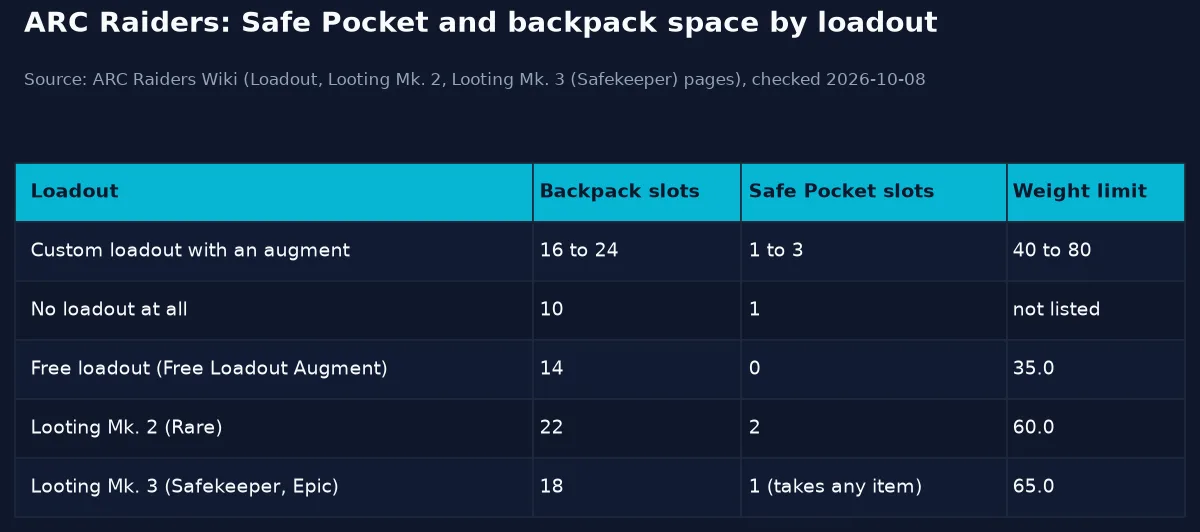 Image: chart by GameBrief, built from the ARC Raiders Wiki loadout and augment pages, checked 2026-10-08.
Two edge cases matter more than they look:
- No loadout at all still counts as a custom loadout and gives you 10 backpack slots and one Safe Pocket. The wiki suggests this for a quick run after one specific item.
- The free loadout equips the Free Loadout Augment: 14 inventory slots, a 35.0 weight limit, and no Safe Pocket. It is free gear, but nothing you find on that run is protected.
If you want more protected space, the augment is the lever. Looting Mk. 2 (Rare) adds "an additional Safe Pocket slot (for a total of two)" and has 22 backpack slots and a 60.0 weight limit. Looting Mk. 3 (Safekeeper) has one Safe Pocket, but it is "a Safe Pocket that allows any items to be stored." The ARC Raiders augments guide compares the other frames.
GODEEPER: The augment you pick sets your backpack, Safe Pocket and weight limit for the whole run. ARC Raiders augments guide →
What each trader sells
Speranza has six traders, and each one sells a different range. Knowing who stocks what saves you from carrying things home that a trader will sell you anyway.
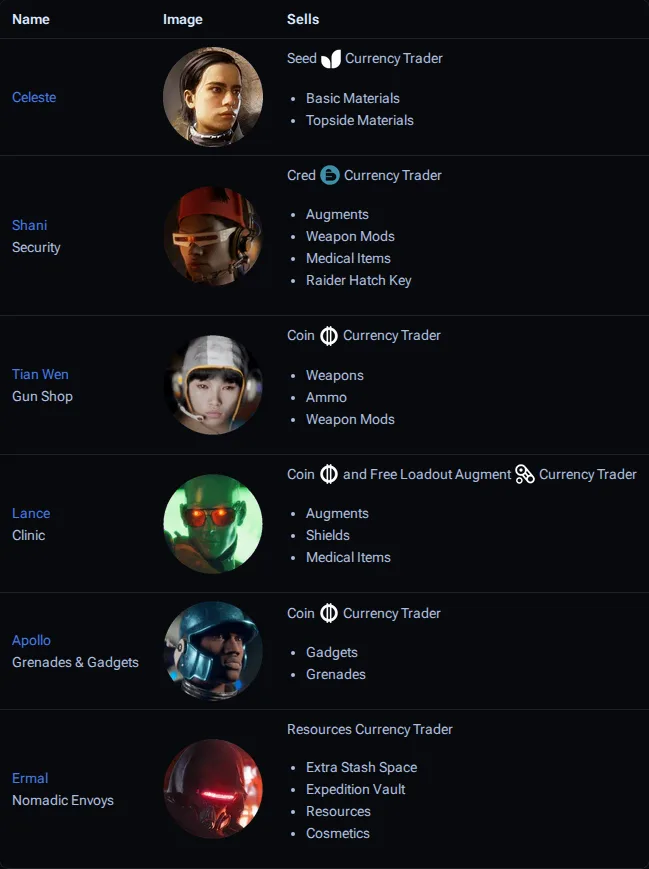 Screenshot: Traders page on the ARC Raiders Wiki (arcraiders.wiki), taken 2026-10-08 before the wiki added the 2.0 changes; the table below is updated.
| Trader | Role | Currency | Sells |
|---|---|---|---|
| Celeste | Seeds | Basic materials, Topside materials | |
| Shani | Security | Coins (since 2.0) | Cameras, Light Sticks and other social items (2.0 notes); pre-2.0 stock included the Raider Hatch Key |
| Tian Wen | Gun Shop | Coins | Weapons, ammo, weapon mods |
| Lance | Clinic | Coins and the Free Loadout Augment | Augments, shields, medical items |
| Apollo | Grenades and Gadgets | Coins | Gadgets, grenades, Epic augments (added in 2.0) |
| Cassio (replaced Ermal in 2.0) | Nomadic Envoys | Resources | Extra stash space, Expedition Vault, resources, cosmetics; Anvil and Hullcracker in the weekly rotation |
Coins buy from Tian Wen, Apollo and Lance, and the wiki is clear about where they come from: "Selling items found Topside is the primary way of gaining Coins." That makes selling the default for loot you have no other use for. Stock is limited, though. Tian Wen used to sell the Anvil hand cannon; since 2.0 the Anvil and Hullcracker sit in the weekly Nomadic Envoys rotation instead, and Launcher Ammo and Energy Clips have a daily purchase limit.
Sell, recycle or salvage
ARC Raiders has two ways to break an item down, and they are not equal. The wiki explains the split: "recycling can only be done in Speranza. In-raid, you can instead salvage the item to yield fewer or lower-quality items."
The Ferro battle rifle shows the gap. Recycling a Ferro I gives 2 Metal Parts and 1 Rubber Parts. Salvaging the same rifle in a raid gives 2 Metal Parts. Selling it gives 475 Coins. A Ferro IV sells for 2,900.
A simple rule follows from that:
- Sell items you have no recipe, quest or project for. Coins buy ammo, shields and weapons.
- Recycle at home when you need the specific materials. Do it in Speranza, not in the raid.
- Salvage in a raid only to free a slot for something better. You are accepting a worse return for space.
Trinkets deserve a second look before you sell. The wiki describes them as "valuable items that can be sold to the Traders for Coins, or used to complete Projects." The Getting Started page adds that trinkets "can be sold for surprising amounts, allowing you to buy additional stash space."
GODEEPER: Where Coins come from, and what to spend them on first. ARC Raiders currency and progression guide →
What players say about sorting loot
Sorting loot is the part of ARC Raiders the community has built the most cheat sheets for. A widely shared keep, sell and recycle sheet on r/ArcRaiders got exactly the reaction you'd expect from u/LokiTheStampede: "Safe to recycle/sell is all I need and thus this is great! Thanks!" That's the right instinct: a short list of what you can safely dump does more for your stash than a full item database.
In the same thread, u/Aether27 flagged a detail that catches people out: "at a quick glance, the numbers of ARC-specific cells needed for some of the workbench upgrades are not accurate. You need 4 Leaper Pulse Units for the Utility Station for example." Workshop stations level up to 3, some to 4 (the Gunsmith gets its fourth level through the Outpost), and each level needs its own materials, so check the station costs before you sell machine parts.
Raider Hatch Keys and why they go in the pocket
The Raider Hatch Key is a Rare item that opens a Raider Hatch, an extraction that "remains locked until a Raider Hatch Key is provided." Once open, the hatch stays open for about 10 to 15 seconds, only one Raider fits through at a time, and hatch terminals "do not have a shutdown timer."
Before 2.0 you could buy the key from Shani for Cred; the 2.0 notes removed Cred and list Shani's new Coin offers without mentioning the key, so check her stock in game. You can also craft it at Utility Station level 2 with the Traveling Tinkerer skill from 1 Advanced Electrical Components and 3 Sensors. It sells for 2,000 Coins. Since a key is useless once you are knocked out, it belongs in the Safe Pocket if you plan to use it.
Scrappy and the materials you do not need to carry
Scrappy, the workshop rooster, collects basic materials for you while you are Topside: Metal Parts, Fabric, Plastic Parts, Chemicals, Rubber Parts and Assorted Seeds. He does not collect while you are offline or idling in Speranza, and he fills up after five rounds, so empty his box between runs.
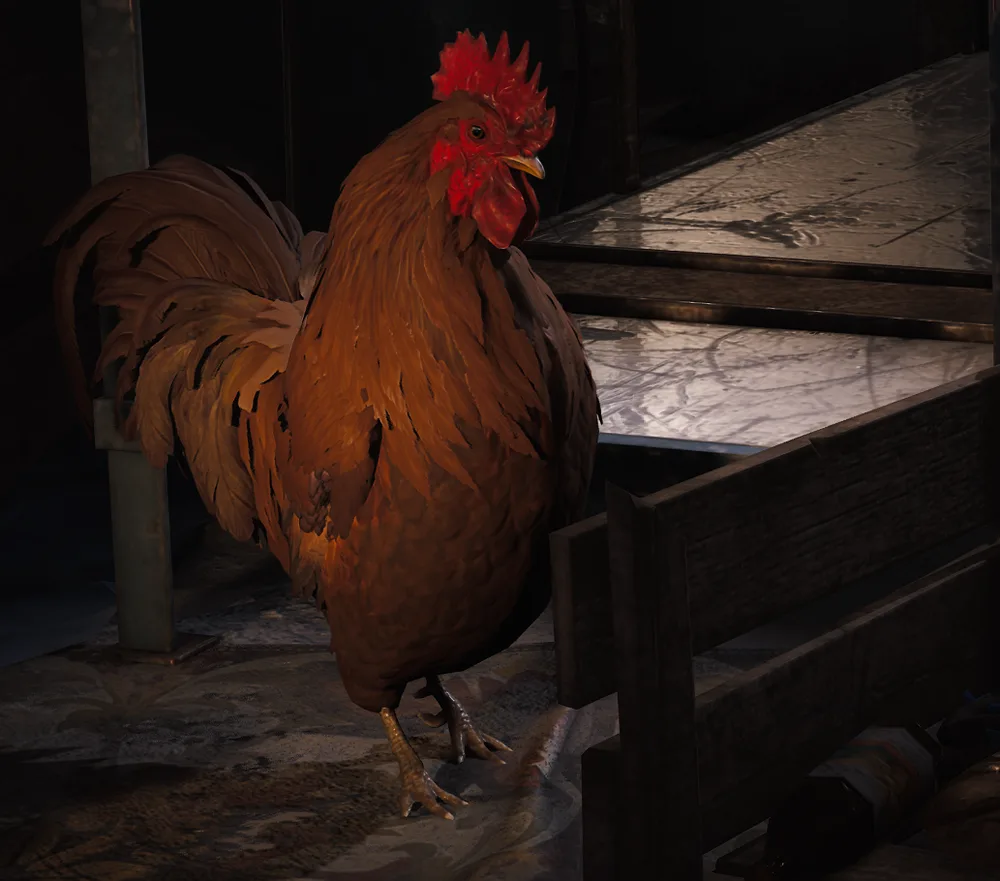 Image: Scrappy, ARC Raiders Wiki (arcraiders.wiki), uploaded by Phentos. Game art is the property of Embark Studios.
Embark added the Scrappy Feeding Boost in the Flashpoint update (patch 1.22.0, March 30, 2026). Feeding him certain items increases the types of loot he collects. If you are short on common materials, Scrappy is a better source than filling your backpack with them on a dangerous map.
Video: "Meet The New Trader," from the official ARC Raiders YouTube channel.
Step-by-Step
1. Pick the augment before you queue: Your augment sets your backpack slots, Safe Pocket slots and weight limit, and you cannot change it Topside. Choose Looting Mk. 2 or similar if the run is about loot.
2. Decide what the Safe Pocket is for: Before you drop, know which item will go there: a quest item, a key you plan to use, or the rarest part you find.
3. Check your trackers: Use the workshop tracking options to tag what your next station upgrade or project needs, so you know which drops are worth a slot.
4. Pick up, then sort: Early in a run, take what you find. As the bag fills, drop or salvage the lowest-value items first.
5. Watch the weight limit: Going over the augment's limit cuts your stamina hard. Drop weight before you head for an extraction.
6. Sell, recycle or store at home: Sell what has no use, recycle what you need materials from, and keep only what you cannot easily craft.
Tips
Do not store what you can craft. The Getting Started page says it is generally "not worth using stash space to store things you can make in the workshop," naming bandages, light shields, shield rechargers and basic weapons and ammo.
Check trader stock before you buy. Some trader stock is limited per day, such as Launcher Ammo and Energy Clips since 2.0.
Use no loadout for a quick item run. Ten slots and one protected pocket can beat a free loadout with no Safe Pocket at all.
Know the Ferro numbers. The Ferro is crafted from 5 Metal Parts and 2 Rubber Parts at the Workbench or Gunsmith 1. The wiki calls it "an inexpensive but effective option" for medium to long range, so it is worth keeping those two materials in stock.
For which weapons to build toward, the ARC Raiders weapons tier list ranks them, and the ARC Raiders crafting guide covers stations and blueprints. New players should start with the ARC Raiders beginner guide. If you plan around weekly goals, the weekly reset guide covers Trials, Feats and the Envoys' offers, and the augments guide covers shields.
Our take
Your loot calls in ARC Raiders come down to the augment and the Safe Pocket, not trader loyalty. No trader pays you extra for sticking with them, so ask three things instead: does a recipe, quest or upgrade need this, is it cheaper to craft than to store, and would losing it hurt? If losing it would hurt, it goes in the Safe Pocket. On a free loadout you don't get that option, so bring nothing you can't afford to drop.
Frequently Asked Questions
What should I put in my Safe Pocket in ARC Raiders? Whatever you would hate to lose: a quest item, a rare blueprint or crafting part, or a Raider Hatch Key. Items in a Safe Pocket are not lost when you go down, while the rest of your backpack is. Most augments give one to three Safe Pocket slots.
Should I sell or recycle items in ARC Raiders? Sell what you have no use for, since selling Topside loot is the main way to earn Coins. Recycle items whose materials you need. Recycling only works in Speranza; salvaging in a raid gives fewer or lower-quality materials.
Which trader buys what in ARC Raiders? Each trader sells a different range: Celeste basic and Topside materials, Shani (Coins since 2.0) cameras, Light Sticks and social items, Tian Wen weapons, ammo and mods, Lance augments, shields and meds, Apollo gadgets, grenades and Epic augments, and the Nomadic Envoys (now Cassio) stash space and the Expedition Vault.
What happens to loot when you die in ARC Raiders? You lose everything you brought or found, except items in your Safe Pocket. The free loadout has no Safe Pocket at all, so anything you find on a free run is at risk until you extract.
How do I get more inventory space in ARC Raiders? Your augment sets it. Augments give 16 to 24 backpack slots, one to three Safe Pocket slots and a 40 to 80 weight limit. Looting Mk. 2, for example, has 22 backpack slots and two Safe Pocket slots. Stash space is a separate thing the Nomadic Envoys sell.
Related Reading
- ARC Raiders Augments Guide: how each augment frame changes slots, weight and Safe Pocket space.
- ARC Raiders Currency and Progression Guide: where Coins and Seeds come from.
- ARC Raiders Crafting Guide: workshop stations, blueprints and recipes.
- ARC Raiders Extractions Guide: getting out alive with what you found.
- ARC Raiders Weapons Tier List: which weapons are worth building toward.
- ARC Raiders Dam Guide: loot areas and extractions on the Dam map.
References
- ARC Raiders Wiki: Loot: recycling and salvaging rules
- ARC Raiders Wiki: Loadout: backpack, Safe Pocket and weight limits, free loadout
- ARC Raiders Wiki: Traders: what each trader sells
- ARC Raiders Wiki: Scrappy: what Scrappy collects and the Feeding Boost
- ARC Raiders patch notes 1.22.0: Embark's Flashpoint update notes, including the Scrappy Feeding Boost
- ARC Raiders on Steam: official store page
- r/ArcRaiders loot cheat sheet thread: community keep, sell and recycle sheet
Was this guide helpful?
Keep reading

Sponsored

Disclaimer
This article is published for informational and entertainment purposes. It does not constitute professional financial, legal, or technical advice. Game performance, online services, patch schedules, and store listings change. Verify critical details (pricing, system requirements, regional availability) with publishers and storefronts before you buy. Affiliate links, where present, help support our editorial work and are labelled in our affiliate disclosure.
About the author

News Desk
GameBrief's byline for industry news, patch notes, studio announcements and esports results. Tight sentences, dated facts.
- News, patch notes and early access
- Industry and esports results
- Sources listed per article