
GuideDead as Disco
Dead as Disco Tips: 15 Things You Learn the Hard Way
Most Dead as Disco frustration traces back to a mistimed song, not your hands: fix My Music first, then learn the perfect windows the game now shows you.
VerdictCalibrate every imported song, spend Takedowns the moment the marker shows, and buy hearts and Perfect Strikes before anything flashy.
These Dead as Disco tips start where the tutorial stops. Most of the friction in Brain Jar Games' Early Access rhythm brawler comes from three places: a custom song that isn't calibrated, perfect windows you haven't learned to read, and Fans spent on the wrong skills. All three are fixable in an evening.

Sponsored

About the game
Dead as Disco
Updated 2026-10-15: Rewritten against Brain Jar's patch notes through the October 1 hotfix and the current r/deadasdiscothegame community. The old version described a hidden "coherence tracker", FLAC decode delays and dance-dependent recovery frames; none of those appear in any official source, so they're gone.
For how Beat Kune Do works from the ground up, start with the Dead as Disco guide. For the buy-or-wait call on the Early Access build, see our Dead as Disco review.
TL;DR: Hit Auto Detect when you add a song, then fix the beat offset (not the BPM) if hits still feel early or late. Watch the dodge button light up for the perfect window. Spend Takedowns the moment the marker appears next to an enemy's health bar. Put your first Fans into hearts and Perfect Strikes, and practise in Free Play with mods turned down.
BESTPRICE: Want Dead as Disco? These stores list it: Buy on Eneba → Buy on Green Man Gaming → Buy on Humble Bundle →
Dead as Disco tips: fix My Music before you blame your timing
My Music is the headline feature: the store page promises you can "play any song in your music library", and the fights stretch to its tempo. It only works if the game knows where the beats are. A song with the wrong BPM or offset makes every attack feel late, and you'll blame your hands.
At launch this was all manual. Brain Jar's roadmap admitted that "for now you'll still need to manually calibrate the beats per minute when you add songs". The Midsummer update on August 3 added a first pass of automatic detection: press the "Auto Detect" button next to Tempo on the My Music window. Treat it as a first guess, because Brain Jar itself asked players to report where it gets things wrong.
When the result is close but not right, open the Advanced Editor (add or edit a song, then pick "Advanced Editor"). The October demo notes lay out what it does:
- The waveform shows pink lines for the beats gameplay is mapped to. If they sit on the kick drum, you're done.
- If the BPM is right but the beats are off, change the beat offset, not the tempo. The offset leaves the BPM alone and just shifts where the beats land.
- The Metronome toggle beeps on every beat so you can hear whether it lines up.
- Calibrate lets you tap along to set BPM and offset by hand, which helps on songs that confuse Auto Detect.
- Start and End times let you skip a long beatless intro without editing the file.
Songs with tempo changes are where Auto Detect struggles most. The Advanced Editor supports custom BPM sections (the June update fixed offsets applying to them incorrectly), so a song that speeds up can still be mapped, it just takes a few minutes.
GODEEPER: How My Music, Infinite Disco and the Idol structure fit together is covered system by system in the main guide. Dead as Disco Guide: Beat Kune Do, Idols, and My Music →
Sponsored

Read the perfect windows the game now shows you
Perfect dodges and counters are where the score and the damage come from, and the UI has become much more helpful since launch. Three changes are worth knowing:
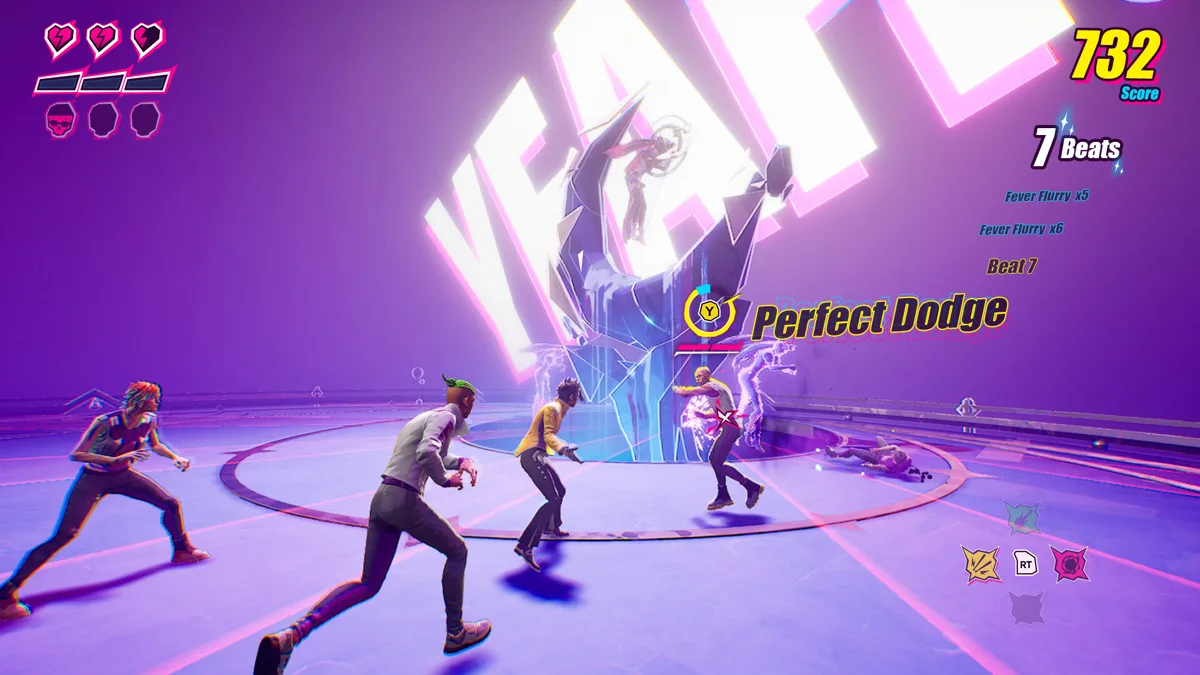
- Counter and Dodge indicators stay on screen briefly after you press, so you can see whether that press was a perfect. Use it to tell if you're early or late.
- Since the September 29 La Pantera update, the dodge button prompt lights up during the perfect window.
- When an enemy starts an unblockable attack (red UI), the button prompt stays grayed out until you're close to the perfect window. Grey means wait, not mash.
 Screenshot: Steam store page
Spend your Takedowns
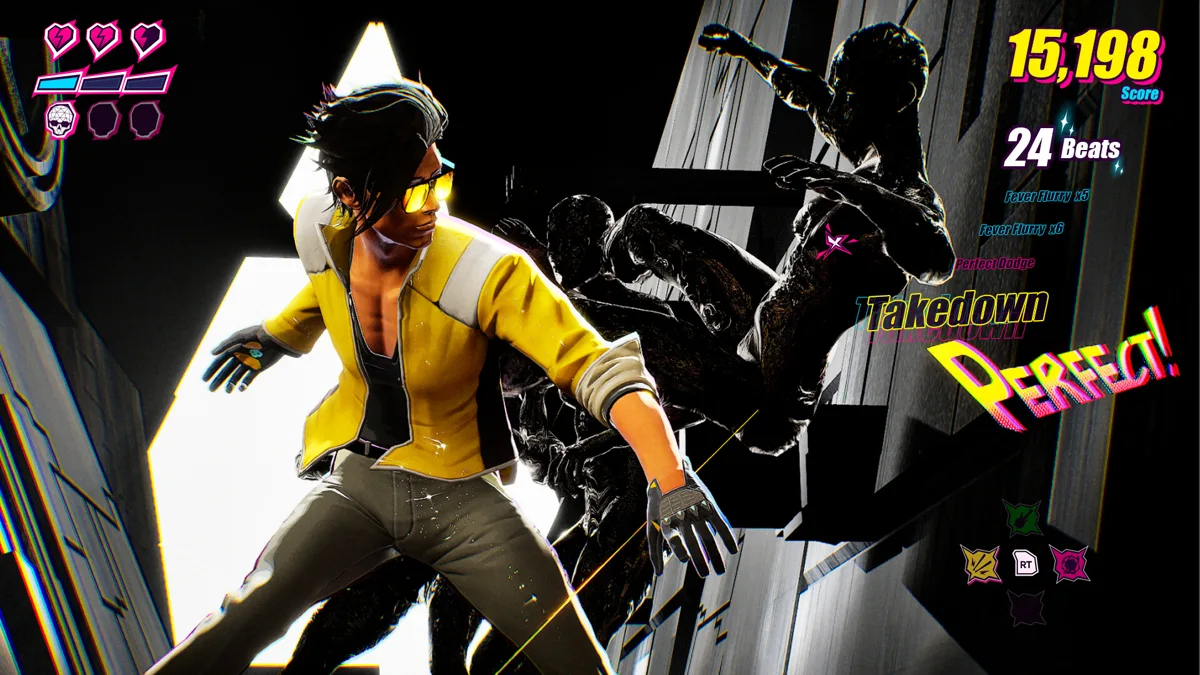
Sitting on Takedowns is a mistake Brain Jar called out by name in the La Pantera patch: they "noticed many players forgetting to use their Takedowns" and added a marker next to an enemy's health bar when a Takedown token is ready. If you find it noisy, it's toggled under Settings > Gameplay > UI > Takedown Indicator, but leave it on while you learn.
Takedowns are also defensive. On the subreddit, a player who'd cleared a fight against two Hemlocks summed up the approach: "Abuse counters and takedowns since they have iframes". Focusing one Hemlock first was the other half of that plan.
One caution if you lean on Hemlock's Bass Invader for safety: the Midsummer patch changed certain frames of it so they "no longer grant Invulnerability, and grant Uninterruptable instead". It still can't be interrupted. You can still get hit.
 Screenshot: Steam store page
Skill trees: what to buy first
Defeating an Idol unlocks that Idol's skill tree and a new signature ability on top of Charlie's own Fever Rush, according to Brain Jar's combat dev diary. Skills are bought with Fans, which you earn as you play; the May hotfix doubled the base rate in Story and Infinite Disco.
Two priorities hold up:
- Hearts first. A community tip that keeps coming up: "get ALL the hearts in the skill tree and it becomes infinitely easier". Extra health buys you time to learn a pattern.
- Perfect Strikes early. The October 1 hotfix made Charlie's Perfect Strikes node hit harder on perfect basic attacks, so Stan enemies stun in 4 perfect hits instead of 5. If you're already hitting on beat, this is free damage.
Don't over-plan beyond that. Brain Jar has said it will keep "revising and expanding the existing skill trees over early access", and the Midsummer patch already reworked Arora's Singularity and Dex's Thunderstruck. Dahlia, the fifth Idol added on September 29, brings a tree that, in the developers' words, "rewards perfection".
Story levels and score: what actually speeds things up
Killing faster doesn't always end a section faster. On the subreddit, a player explained that "Everything before the actual boss fights is time-scripted", with Prophet's bouncer room as the exception. Other players add that enemies keep spawning until the scripted time hits, so fast kills raise your score rather than skip ahead. If you're chasing stars, farm points in those windows; if you're just trying to clear, play safe and survive.
Between levels, don't skip The Encore. Players report that some challenges, Double Trouble among them, only unlock once you finish characters' storylines there: "Some challenges unlock that way like double trouble".
Screenshot: Steam store page
Practise in Free Play with mods
There's no tutorial gym, but Free Play does the job. The Early Access launch notes describe it as a place to "groove at your own pace" and build your own challenges from arenas, objectives, mods and enemies. Since Update 1 in June the Mods section lets you change enemy damage multipliers, enemy health, Fever bars, Takedown tokens, Fever generation speed and hearts.
Turn enemy damage down and hearts up, load a song you've calibrated, and drill perfect dodges against one enemy type. It's the closest thing to a practice mode the game has.
Brain Jar's minute-long Midsummer trailer is the update that brought Auto Detect. Around the 20-second mark a fight on the new beach arena runs with a "My Music" tag and track timer in the corner, and the outfit montage that follows shows the summer wardrobe the update added.
Co-op: don't plan around it yet
Co-op is on the roadmap, without a date. Brain Jar's own wording is "we won't release it until it's ready", because Beat Kune Do creates new multiplayer problems. Nothing about current skill trees or progression is confirmed to carry into co-op, so build for single player. If you want something to play with a friend tonight, our best co-op games right now list is the better place to look.
Our take
If Dead as Disco feels unfair, check the song before you check yourself. A minute in the Advanced Editor fixes more missed perfects than an hour of practice on a song that's out of sync. After that, the game rewards the boring habits: spend Takedowns, wait for the lit prompt, and buy survivability before style. Whether the Early Access build is worth it at all is a separate question, and our review answers it.
Quick reference: 15 Dead as Disco tips
- Press Auto Detect next to Tempo when you add a song to My Music.
- Fix the beat offset, not the BPM, when hits feel consistently early or late.
- Turn on the Metronome in the Advanced Editor to hear whether beats line up.
- Use Calibrate to tap in the tempo on songs Auto Detect gets wrong.
- Trim beatless intros with Start and End times instead of editing the file.
- Check the lingering indicator after a dodge or counter to see if it was perfect.
- Dodge when the button lights up: that's the perfect window.
- Wait out grey prompts on red unblockable attacks.
- Spend Takedowns as soon as the marker appears by an enemy's health bar.
- Use counters and Takedowns defensively: players report invulnerability frames.
- Don't trust Bass Invader to make you invulnerable after the Midsummer patch.
- Buy hearts first in the skill trees.
- Take Perfect Strikes early if you already hit on beat.
- Farm score in time-scripted sections only if you're chasing stars.
- Practise in Free Play with enemy damage down and hearts up.
Related Reading
- Dead as Disco Guide: Beat Kune Do, Idols, and My Music: The foundational guide covering every major system in the EA build
- Dead as Disco Review: Beat Kune Do Is the Real Deal: Full review covering what works, what needs polish, and the verdict
- Dead as Disco Early Access Launch 2026: Launch feature covering the roadmap, EA scope, and buy-or-wait question
- Miss Killer Dream Rhythm Island Beginner Guide: another 2026 take on rhythm-driven combat
- Die in the Dungeon Tips Guide: another 2026 Early Access game where what you buy first shapes the early hours
- Early Access Games Worth Buying in 2026: more 2026 Early Access games worth a look once you've had your fill of Disco
- Yunyun Syndrome Review: Infectious Denpa Horror: a very different 2026 rhythm game, for anyone who wants another beat-driven pick after Dead as Disco
Frequently Asked Questions
Why does combat feel off-beat with my own song in Dead as Disco? Usually the song's tempo or beat offset is wrong, not your timing. Press Auto Detect next to Tempo; if the BPM is right but hits still land early or late, open the Advanced Editor and adjust the beat offset with the Metronome on.
Do I still have to set the BPM manually for My Music? Not always. At launch every song needed manual calibration. The Midsummer update on August 3, 2026 added a first pass of automatic BPM and offset detection, and the Advanced Editor still offers manual BPM, tap-to-Calibrate and Start and End times.
Does the order I fight Idols matter for the skill tree? Each Idol you defeat unlocks that Idol's skill tree and signature ability, so order decides which tree you can spend Fans in first. Brain Jar plans to keep revising the trees during Early Access.
Is there a way to practice outside the story? Yes. Free Play lets you build custom challenges, and its Mods can lower enemy damage and raise hearts, which makes it a workable practice room.
When is co-op coming to Dead as Disco? No date. It's on the roadmap, and Brain Jar says it won't release co-op until it's ready.
Why should I use Takedowns as soon as they're ready? Brain Jar added a ready marker after seeing players forget them, and players report counters and Takedowns give invulnerability frames.
Does finishing the Encore storylines matter? For completionists, yes. Players report some challenges, such as Double Trouble, unlock only after you finish characters' storylines in The Encore.
References
- Dead as Disco on Steam: store page and feature list
- Dead as Disco Early Access: The Road Ahead: roadmap, manual BPM at launch, co-op status, skill tree plans
- Midsummer update patch notes and announcement: Auto Detect, Bass Invader change
- La Pantera update patch notes: Takedown indicator, dodge perfect window, Perfect Strikes hotfix
- October demo update: Advanced Music Editor: BPM, beat offset, Metronome, Calibrate
- Dev Diary #1: Combat in Dead as Disco: Idol skill trees and signature abilities
- r/deadasdiscothegame: community tips quoted above
- The Midsummer Update Takes the Stage!: Dead as Disco on YouTube
Was this guide helpful?
About the author

Indie & JRPG Desk
GameBrief's byline for indie, JRPG, visual novel and cozy games. Warm, direct, and willing to say which one to buy.
- Indie, JRPG and visual novels
- Early access and survival
- Sources listed per article
Keep reading

Dead as Disco Review: Beat Kune Do Is the Real Deal
Reviews · 8 min

Dead as Disco Guide: Beat Kune Do, Idols, and My Music
General · 10 min

Dead as Disco Early Access Launch 2026: Worth Buying?
Features · 8 min
Romestead Biome Guide: All 4 EA Biomes, Progression 2026
General · 12 min
Romestead Wiki 2026: All Biomes, Gods, Raids and Co-op Guide
General · 22 min
DRG Rogue Core Classes: All 5 Reclaimers Explained 2026
General · 10 min
Sponsored
Disclaimer
This article is published for informational and entertainment purposes. It does not constitute professional financial, legal, or technical advice. Game performance, online services, patch schedules, and store listings change. Verify critical details (pricing, system requirements, regional availability) with publishers and storefronts before you buy. Affiliate links, where present, help support our editorial work and are labelled in our affiliate disclosure.
Comments
Loading comments…