
GuideBeastro
Beastro Flavor Guide: 6 Tastes, Cooking & Combat Tips
This Beastro flavor guide covers the part that takes most players too long to understand: cooking is not just a restaurant activity. Ingredients unlock cards, meals improve Caretaker abilities, and the flavor on a card changes how it interacts with the rest of the combat system. The exact roster and pair charts in older guides are less reliable than the current card text and official patch notes.

Sponsored

Updated 2026-10-05: Steam now lists Beastro at $19.99 with Very Positive across 648 all-language reviews; the six-flavor and five-Caretaker roster remains confirmed by the dedicated Beastro Wiki.
TL;DR: Beastro has six flavor types: Bitter, Salty, Sour, Sweet, Umami and Spicy. Ingredients unlock cards, and official material says flavors can balance and enhance one another. Start with the ingredients and Caretaker the current story gives you, then read the card tooltips before committing to a supposed “best” pair. Exact numerical pair bonuses remain patch-sensitive.
Sponsored

Beastro flavor guide: what are the six tastes? (quick answer)
The dedicated Beastro Wiki flavor page lists six types: Umami, Bitter, Salty, Sour, Sweet, and Spicy. The Steam and official site descriptions explain that dishes build Caretaker decks, each ingredient unlocks a card, and combat uses flavor magic that can be matched, neutralised or enhanced.
That is the safe foundation for a new deck. The wiki confirms the roster, but exact colors, unlock order and numerical combat multipliers can still change with patches. When an encounter displays a flavor icon, read the current card and effect text before you decide what to cook next.
Current status: October 2026
Beastro is released on Steam, Xbox and PlayStation. Steam currently lists $19.99, 42 achievements and a Steam Deck Playable rating. Its all-language review snapshot is Very Positive with 600 positive and 48 negative reviews, 648 total. Xbox's launch material lists PC Game Pass and Game Pass Ultimate availability. The latest official Steam patch located for this audit is v1.0.6, which added keyword descriptions and fixed tutorials, enhancers, shields, summons and cooking-minigame issues.
Step-by-step: turn ingredients into a combat-ready deck
Step 1: Gather ingredients. Keep a small pantry with more than one documented flavor so the next request does not force a full rebuild.
Step 2: Cook a simple dish. Use the available sauté, chop, boil, roast or assemble activity and note the ingredient's flavor, power and effect.
Step 3: Inspect the cards. Check the number, flavor and effect text the dish unlocks before deciding whether to repeat the recipe.
Step 4: Match the Caretaker. Compare the meal with the Caretaker's current request and ability text instead of assuming an old roster or role chart.
Step 5: Test the interaction. Bring the resulting cards into an encounter and record what balance or enhancement wording the current build displays.
How ingredients become combat cards
The game's useful idea is that the kitchen is part of the deckbuilder. The official website says each ingredient unlocks a card, and Steam describes meals building Caretaker decks. That means your ingredient choices are strategic even before the puppet-theater encounter begins.
PlayStation's official preview gives the reliable version of the input model: ingredients have a flavor, a power level and possible effects. The cooking activities include sauté, chop, boil, roast and assemble. Those are confirmed activities. The exact card produced by a particular dish, the quality thresholds for a “Fantastic” result, and the claim that every ingredient produces a fixed number of cards should be checked against the current station tooltip rather than treated as universal rules.
In practice, use a short feedback loop. Cook a simple dish, inspect the cards it unlocks, then compare the result with the Caretaker's current abilities. If a new ingredient produces a card with an effect you actually need, keep it in rotation; if it only increases a number without helping the encounter, change the dish before you build a whole supply chain around it.
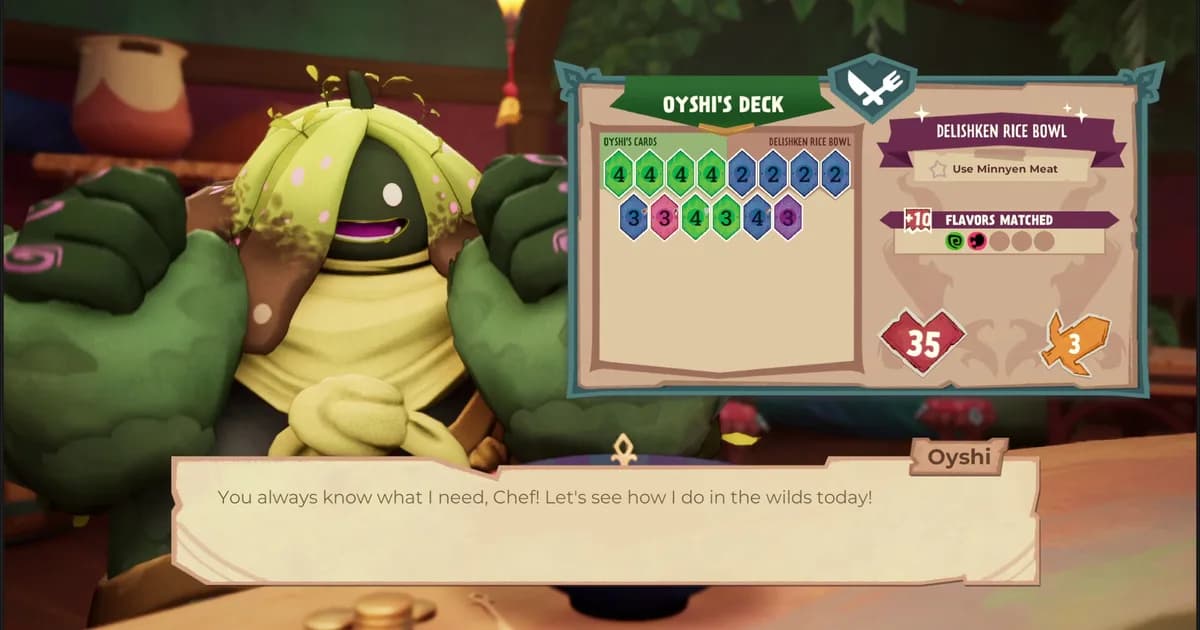
Puppet-theater battles display health, card values and flavor information together. Read all three before judging a card by its number alone.
GODEEPER: For a full breakdown of which specific cards to build toward in each chapter, the deck-building guide covers the strongest card effects by Caretaker type. Beastro Deck Building Guide: Best Cards and Combos →
What balance and enhancement mean
The broad mechanic is confirmed even where the complete chart is not. Xbox's official guide says cards show a number followed by the flavor, effectively a suit, and that flavors “balance and enhance each other.” Steam uses the same idea in its store description. That tells you to compare flavor interactions, not only printed card values.
The article previously presented three enhancement pairs, three balance pairs, a trump-suit rule and numerical consequences as a complete chart. The primary sources checked here do not publish that full matrix. Rather than turn an old community table into fake certainty, use this method:
- Check the flavor on the card and on the enemy or encounter effect.
- Read the current tooltip for “balance,” “enhance” or any named status effect.
- Test a small dish and note what changes in the next fight.
- Keep a backup ingredient line until the current version proves the combination is stable.
This is not a weaker deck-building rule. It is a more honest one for an actively patched game. A pair that worked in an early story build may be rebalanced, renamed or presented differently after a patch. The current v1.0.6 notes specifically added keyword descriptions, making the in-game explanation more useful than an undated tier chart.
Caretakers and flavor regions
Official material confirms that Caretakers come from flavor regions and that meals improve their abilities. PlayStation's preview identifies Oyshi as the Umami Caretaker and Kalan as the Bitter Caretaker. Those are safe roster anchors.
The dedicated Beastro Wiki Caretaker page lists all five: Oyshi (Umami), Kalan (Bitter), Sunna (Salty), Colsi (Sour), and Azur (Sweet). It is a useful roster reference, but exact roles, unlock order and numerical pair bonuses remain patch-sensitive, so use current ability text alongside the names.
That distinction matters for practical planning. A flavor label can describe a region, an ingredient, a card or a Caretaker preference, and those are not automatically the same thing. Do not infer a full combat archetype from a region name. Watch what the Caretaker asks for, what ability the meal improves, and what the resulting cards do in the next encounter.
The post-cooking screen is the best place to compare the dish, the Caretaker and the cards before you lock in a kitchen routine.
Practical deck building without a fake tier list
Start with one primary flavor that your current Caretaker and pantry support. Add a second only when the card text gives you a useful balance or enhancement interaction. This keeps the deck readable while you learn the trick-taking rhythm. It also prevents the common mistake of spreading ingredients across every color before you know which cards your story unlocks.
Do not assume that mono-flavor is always bad or that two flavors are always best. The current official material supports interaction, not a universal ranking. Some encounters may reward a focused effect; others may punish a narrow answer. The right question is not “which pair wins the whole game?” It is “which cards can this kitchen reliably produce for the next fight?”
Treat cooking requests as information, not as a permanent build command. If the Caretaker asks for a flavor you cannot produce efficiently, make the best available dish and keep the request in mind for the next service. When a patch changes a keyword or card effect, reread the current tooltip before following an old route.
Tips for the kitchen-to-combat loop
Keep a small reserve of ingredients with different flavors. A pantry made entirely of one ingredient makes it harder to react when an encounter asks for a different effect. Check new recipes immediately, but do not spend rare materials on a complete kitchen overhaul until you have seen the cards they unlock.
Use the official patch history as a freshness check. v1.0.5 and v1.0.6 mention named entities such as Watoucan, Salty Map, Conedor, Bubblizard, Spiky Caretaker, High Winds, Terranamis and stackshrooms, but a patch-note appearance is not a complete roster or a tier list. It is useful evidence that these mechanics exist in particular versions, not proof that every old recipe table is current.
When a combat result surprises you, record the card number, flavor, effect and encounter modifier. That small note is more useful than copying a “best build” list because it remains tied to your patch. The same habit makes it easier to tell whether a weak dish failed because of its ingredients, its flavor interaction or the encounter itself.
GODEEPER: The tips guide covers caretaker food preferences and how the cooking station upgrades change card output quality. Beastro Tips: Cooking, Caretakers, and What the Game Doesn't Tell You →
Related Reading
- Beastro Release Date: Cooking Deckbuilder Hits June 11: out since June 11, 2026 on Steam, Game Pass and PS5; platform details and what shipped at launch.
- Beastro Tips: Cooking, Caretakers, and What the Game Doesn't Tell You: expanded tips covering the daily cycle, fishing timing, and caretaker unlock order.
- Beastro Deck Building Guide: Best Cards and Combos: specific card recommendations by Caretaker and which effects are worth building around.
- Beastro Review: Cozy Deckbuilder on Game Pass: full verdict on whether the game holds up across all chapters and whether it's worth playing through Game Pass.
- Beastro Complete Guide Hub: a current index of the game's major systems.
- Beastro Advanced Recipe Guide: recipe context to pair with the flavor and card rules here.
- Beastro Boss Guide: encounter context for testing balance and enhancement interactions.
- Beastro Release Date Coverage: platform and launch context.
- Best Indie Games Under $20 in 2026: compare Beastro's current price with other indie picks.
- Best Indie Roguelites Steam Summer Sale: a broader deckbuilder and roguelite comparison.
Frequently Asked Questions
What are the documented flavors in Beastro? The dedicated Beastro Wiki lists six flavor types: Umami, Bitter, Salty, Sour, Sweet, and Spicy. Official material confirms that ingredients unlock cards and that flavors can balance or enhance one another, while exact numerical pair bonuses remain patch-sensitive.
How does cooking affect combat in Beastro? Official material says ingredients unlock cards and meals improve Caretaker abilities. Ingredients have flavor, power and possible effects, while cards use a number and a flavor. The checked primary sources do not verify a universal last-dish trump-suit rule or exact card-quality thresholds.
What caretaker should I start with? The five Caretakers are Oyshi (Umami), Kalan (Bitter), Sunna (Salty), Colsi (Sour), and Azur (Sweet), according to the dedicated Beastro Wiki roster. Use the current story and ability text rather than assuming a universal tier list.
What does enhancement mean in Beastro combat? The official store and Xbox material confirm that flavors can balance and enhance each other. They do not publish a complete pair matrix in the sources checked here, so treat exact enhancement pairs and numerical bonuses as patch-specific until the current game text confirms them.
How many flavor types should my deck have? Start with the flavor your current Caretaker and ingredients support, then add a second flavor only when its current card text gives you a clear reason. The official sources support the balance/enhance concept, not a universal two-flavor ranking.
Is Beastro on Game Pass? Yes. Official Xbox material lists Beastro in PC Game Pass and Game Pass Ultimate. Steam currently lists the $19.99 standard price.
References
- Beastro on Steam: store page, platform list, and feature set
- Beastro official site: Caretaker regions, ingredient/card loop and recipe examples
- Beastro Launch Day Coverage, Xbox Wire: official Game Pass launch announcement with Timberline Studio design notes
- Beastro PS5 Announcement, PlayStation Blog: flavor system design overview from Timberline
- Beastro v1.0.6 patch notes: current keyword, tutorial, enhancer, shield, summon and cooking fixes
- Beastro v1.0.5 patch notes: named status and Caretaker mechanics
- Beastro Wiki: Flavor Profiles: full enhancement and balance chart for all six flavor types
- Beastro Wiki: All Caretakers: roster confirmation for all five Caretakers and their flavor origins
Was this guide helpful?
About the author

Systems & Economy Desk
GameBrief's byline for roguelikes, strategy and simulation. Reads patch notes, wiki tables and Steam stats and puts the numbers on the page.
- Roguelikes, strategy and simulation
- Builds, progression and economy
- Sources listed per article
Keep reading

Beastro Release Date: Cooking Deckbuilder Hits June 11
General · 4 min
Beastro Tips: 9 Things to Know Before You Start Cooking
General · 13 min

Beastro Review: A Cozy Deckbuilder Worth Your Time
General · 9 min

Beastro Deck Building Guide: Best Cards and Combos 2026
General · 10 min

Beastro Advanced Recipe Guide: Spicy, Eggs & Late Unlocks
General · 10 min

Beastro Complete Guide: Flavors, Decks, Caretakers 2026
General · 14 min
Sponsored
More game deals · affiliate links
Disclaimer
This article is published for informational and entertainment purposes. It does not constitute professional financial, legal, or technical advice. Game performance, online services, patch schedules, and store listings change. Verify critical details (pricing, system requirements, regional availability) with publishers and storefronts before you buy. Affiliate links, where present, help support our editorial work and are labelled in our affiliate disclosure.
Comments
Loading comments…