
GuideStarRupture
StarRupture Dedicated Server After Update 3: What Works Now
Update 3 left servers on build 0.3.5. A day later the studio promised them back, with no date, so every server group has to pick a version now.
VerdictGroups split across time zones should keep the server on 0.3.5 and back up saves. Groups that play at the same hour lose less by hosting Update 3 co-op.
A StarRupture dedicated server still works after Update 3, but only on version 0.3.5: every player has to switch the game to the Steam branch v.0.3.5_for_ds, and the server tool stays on the build Creepy Jar last updated on October 5. On November 20 the studio reversed its plan to drop dedicated servers and promised full support for Update 3 "in a future patch", without a date.

Sponsored

About the game
StarRupture
Creepy Jar · Creepy Jar
Until that patch ships, a server group has two options. Stay on 0.3.5 and give up everything Update 3 added, or move to a hosted co-op game on the live build. We'd keep the server only if your group plays across time zones.
 Image: Creepy Jar, StarRupture announcement on Steam (November 20, 2026)
Sponsored

StarRupture dedicated server status, build by build
Build numbers are Steam's own app data as of November 21; dates come from Creepy Jar's Steam posts. All times are UTC.
| Date (UTC) | What changed | Where it shows |
|---|---|---|
| October 5 | Hotfix 0.3.5 ships. The server tool (app 3809400) gets build 25642172, its last update so far | Steam news; SteamCMD |
| October 20 | October developer blog: active support for dedicated servers ends | Steam news; Creepy Jar support page |
| October 29 | Update 3 opens on the Public Test Branch, with no dedicated server for it | Steam news |
| November 19, 09:20 | The live game moves to build 26750759, Update 3 | SteamCMD |
| November 19, 10:26 | Branch v.0.3.5_for_ds gets build 26781824, described as "Dedicated Server build - v.0.3.5" | SteamCMD; Update 3 notes |
| November 20, 14:00 | Creepy Jar: dedicated server support comes back in a future Update 3 patch | Steam news |
Two lines in Steam's data say more than the announcements do. The server tool is now named "StarRupture Dedicated Server (Experimental - only for build 0.3.5)", and its only listed operating system is Windows. Doom Hosting and Dedicated Game Servers both say Linux hosts run it under Wine, which is the only Linux route today.
GODEEPER: What the game does well once a base is running, and where large rail networks still stall. StarRupture Review: Very Positive, But Bases Still Freeze →
BESTPRICE: Want StarRupture? Eneba sells a Steam key: Buy on Eneba →
How to keep a StarRupture server on version 0.3.5
1. Back up every save before anyone launches Update 3: On a player's PC the saves sit in Steam\userdata\<SteamID>\1631270\remote\Saved\SaveGames, or in C:\Users\<you>\AppData\Local\StarRupture\Saved\SaveGames if that folder is empty, per Creepy Jar's Public Test Branch post and gameserverhosting.co.uk. On the server the world lives in StarRupture\Saved\SaveGames\<SessionName>\ as AutoSave0.sav with its .met file. Copy both, because nobody at Creepy Jar has said whether a save that Update 3 has opened will load on 0.3.5 again.
2. Switch every player's game to v.0.3.5_for_ds: In the Steam Library, right-click StarRupture, open Properties, then Game Versions & Betas, and pick v.0.3.5_for_ds. Steam downloads the older build by itself. The Update 3 notes, the November 20 post and the support page give the same five steps.
3. Leave the server tool alone, or reinstall app 3809400: There is no Update 3 server build to download, so an update check changes nothing. For a clean install, the support page's command is steamcmd.exe +force_install_dir C:\StarRuptureDS\ +login anonymous +app_update 3809400 validate +quit. Steam's app data marks the tool free to download, and Doom Hosting notes that an anonymous login normally works.
4. Check the launch line and the port: Creepy Jar's example line for SRServerWithLog.bat is start .\StarRuptureServerEOS.exe -Log -port=7777. The support page and gameserverhosting.co.uk both warn that game updates can reset those arguments, so open the file after any change on the server PC and make sure the port still matches the one forwarded on your router.
5. Switch back only when the fix is in the patch notes: The way back is "Default Public Version" in the same Steam tab. Wait until a Creepy Jar post names the server change, and until SteamCMD shows app 3809400 on a build newer than 25642172. A game update without a new server build puts your players back on a version the server can't match.
What staying on 0.3.5 costs you
Everything below is in the Update 3 notes of November 19. The server build predates all of it, and gameserverhosting.co.uk says the same about Custom Game: its options "do not apply to dedicated servers".
 Image: Creepy Jar, Update 3 announcement on Steam (November 19, 2026)
| Update 3 feature | What it does | On a 0.3.5 server |
|---|---|---|
| Custom Game | 21 options by our count: 6 for building, 8 for enemies, 6 for the player, 1 for the world | Not available |
| Hotbar | Several rows of quick slots for weapons, consumables and buildings | Not available |
| Key rebinding rework | Rebuilt for the new features and for other keyboard layouts such as AZERTY and QWERTZ; old custom binds reset to default | Not available |
| Co-op combat balance | More Vermin in expeditions, base defense and combat events, scaled to the player count | Not available |
| Patch notes | 143 entries in ten sections by our count, 10 of them under "Multiplayer issues" | Not available |
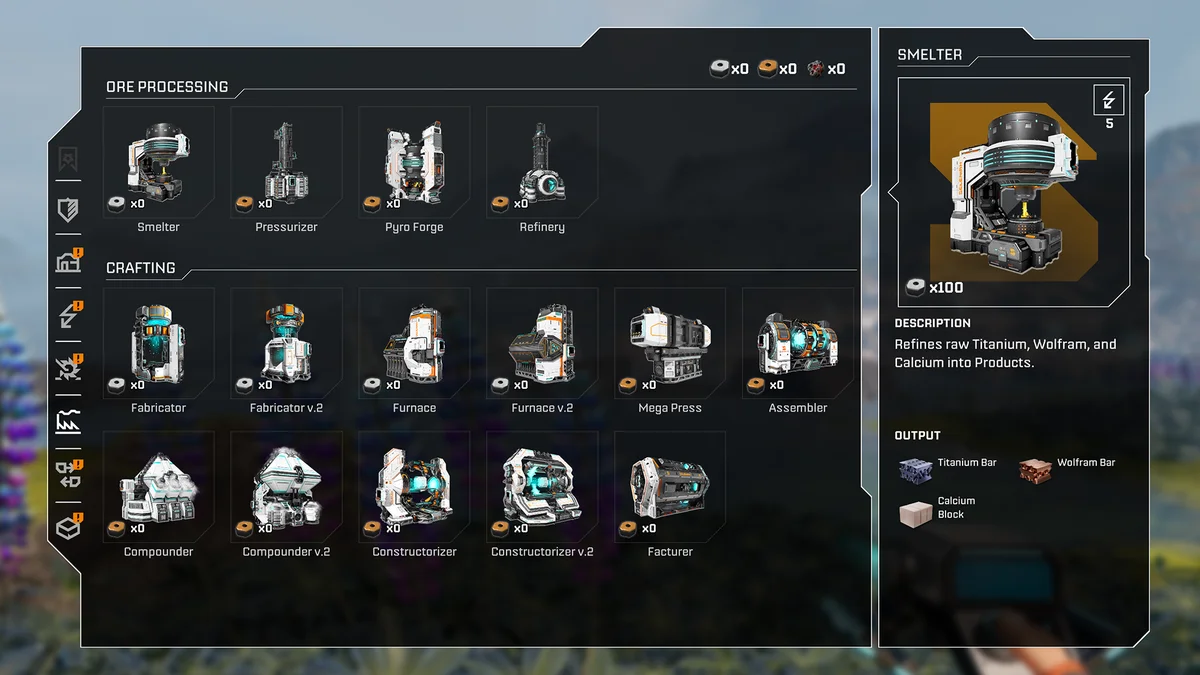 Image: Creepy Jar, Update 3 patch notes on Steam. With "Building costs" off, every machine in the build menu costs nothing.
Custom Game is the loss most groups will feel. A Steam thread titled "Can you turn off bug spawning in options yet?" had 24 replies by November 19, and Update 3 answers it twice, with Passive enemies and Disable all enemies. A hosted game can also change most options mid-campaign: the patch notes say they can be set when you load an existing save, and a player on the Steam forum found them on the Load Game screen, not behind Continue. Four can only be set on a new game: Building stability, Starting corporations level, Starting character skill level and Unlock all inventory slots.
Dedicated server or hosted co-op until the patch
Keep the 0.3.5 server if your group plays at different hours. That is the case the server exists for, and one player in the 44-reply Steam thread on the subject put it plainly on October 24: they play from different time zones, and if they can only play when "the host" is on, "there is no point in playing at all." For that group a frozen build with no Hotbar beats a world that is offline most of the day.
Move to hosted co-op on Update 3 if you all play at the same time anyway. You get Custom Game, the Hotbar and the new co-op scaling, and you lose nothing a server would add for you. The catch is the world: Creepy Jar's posts don't say whether a dedicated server save can be loaded into a hosted game, and RespawnHost noticed the same gap back in October. Treat it as a fresh start until someone confirms otherwise.
Switch games for a while if the server matters more than StarRupture does. Romestead shipped its own server tool on day one, and Palworld's dedicated servers take 32 players against 4 in hosted co-op.
GODEEPER: If the group wants a co-op base builder while it waits, these are the eight we rank highest this year. Best Base-Building and Colony Sim Games in 2026: 8 Picks →
Mistakes that break a 0.3.5 server
Running the server and the game on two PCs with one Steam account. Creepy Jar's support page says Steam allows one active session per account, so a server launched from the Steam client on a second PC fights the player's game. Launch it from the .bat file, run it on the same PC, or use a second account. Doom Hosting gives the same .bat advice: start the server from a script, not from Steam's Play button.
Leaving Steam open next to a SteamCMD install. The support page says you have to log out of Steam or close it on that machine, or you can't manage the server from the game. gameserverhosting.co.uk lists the same fix for "Cannot manage the server while Steam is open".
Letting one player update. A player on the default branch is on Update 3 and won't match a 0.3.5 server. RespawnHost and Supercraft both make the point that the world keeps working only while every player stays on 0.3.5, so post the branch name in your group chat before the weekend session.
What the November 20 post promises, and what it leaves out
Creepy Jar wrote that it will "bring back active support for Dedicated Servers in StarRupture Early Access" and plans "to restore full Dedicated Server functionality in a future patch for StarRupture Update 3." FPSNews reported the post the same day. There is no date, no build number and no word on Linux.
Players had argued about it for a month. "WARNING - Dedicated Server support being removed!" opened on October 22 and had 44 replies when we read it; "No dedicated server NO BUY" went up on November 18, the day before Update 3. The reversal came one day after the update: fast for a studio, slow for anyone whose server stopped matching the live game on November 19.
Our read: plan for weeks, not days. Update 3 itself spent three weeks on the Public Test Branch, from October 29 to November 19, and the November 20 post names no server test build yet.
Save compatibility: the question no post answers
None of Creepy Jar's four Steam posts on the change (October 20, October 29, November 19 and November 20) or the support page says whether a 0.3.5 server world will open in the patched Update 3 server, or whether a save that Update 3 has opened still loads on 0.3.5. We left both as open questions.
We have not run a StarRupture server or played Update 3.
Checked: November 21, 2026, 06:30 to 06:56 Vietnam time. SteamCMD app data (anonymous login, app_info_print) for apps 1631270 and 3809400, read at 06:47 Vietnam time (23:47 UTC on November 20); Steam news for StarRupture (Update 3, the November 20 post, the October developer blog, the Public Test Branch post), the Creepy Jar support page on dedicated servers, Steam's player count, five Steam discussion threads, gameserverhosting.co.uk, Doom Hosting, Dedicated Game Servers, Supercraft, RespawnHost and FPSNews.
Copy the saves, then watch app 3809400
Copy the client and server SaveGames folders, then send your group the branch name v.0.3.5_for_ds and ask everyone to switch before the next session. After that, check one thing each week: the build number of app 3809400 in SteamCMD (app_info_print 3809400). It has read 25642172 since October 5, so the day it changes is the day to read Creepy Jar's notes and plan the move back to the live build. Our StarRupture review covers the late-game base problems you'll meet on either build.
Related Reading
- StarRupture Review: Very Positive, But Bases Still Freeze: the Fire Wave, the rail network and the performance problem on big bases.
- Best Base-Building and Colony Sim Games in 2026: StarRupture next to Timberborn, Romestead and five more, with co-op picks.
- 8 Best Indie Automation Games for Steam Train Fest 2026: factory and logistics games for the same kind of group.
- Romestead Review: an 8-player survival town builder that shipped with its own server tool.
- Palworld Review: where dedicated servers change the player cap.
- Windrose Multiplayer Tips: hosting a lobby versus running a server in another co-op survival game.
- Best Early Access Games Worth Buying Right Now: what else is in Early Access and how far along it is.
References
- StarRupture on Steam, Creepy Jar
- Update 3: Custom Game, now available, Creepy Jar on Steam, November 19, 2026
- Important update on the dedicated servers support, Creepy Jar on Steam, November 20, 2026
- Developer Blog: October 2026, Creepy Jar on Steam, October 20, 2026
- StarRupture Update 3: Custom Game, now on Public Test Branch, Creepy Jar on Steam, October 29, 2026
- Hotfix 0.3.5, Creepy Jar on Steam, October 5, 2026
- Dedicated Servers (Steam), StarRupture Support, Creepy Jar
- WARNING - Dedicated Server support being removed!, Steam Community discussion, October 22, 2026
- No dedicated server NO BUY, Steam Community discussion, November 18, 2026
- How to adjust the new world options on existing game?, Steam Community discussion, November 19, 2026
- StarRupture Server Settings and Config Files Explained, gameserverhosting.co.uk
- StarRupture Dedicated Server Setup 2026: DSSettings and Saves, Doom Hosting
- StarRupture Dedicated Server Setup 2026, Dedicated Game Servers
- StarRupture is dropping dedicated servers, RespawnHost, October 21, 2026
- Star Rupture Dedicated Server Setup, Supercraft
- StarRupture: le support des serveurs dédiés fait son retour, FPSNews, November 20, 2026
Was this guide helpful?
About the author

Systems & Economy Desk
GameBrief's byline for roguelikes, strategy and simulation. Reads patch notes, wiki tables and Steam stats and puts the numbers on the page.
- Roguelikes, strategy and simulation
- Builds, progression and economy
- Sources listed per article
Keep reading
StarRupture Review: Very Positive, But Bases Still Freeze
General · 11 min
How to Play Scam With Your Friends: Setup, Scams, Privacy
Guides · 10 min
Besmirch Multiplayer: 6 Facts About the Unstable Co-op
General · 9 min

Deep Rock Galactic Season 7 Overclocks: All 22 and 11 Perks
Guides · 10 min

How Many Days in Gamble With Your Friends, and How It Ends
Guides · 7 min
Is Helldivers 2 Worth It? What Players Say in 2026
Guides · 9 min
Sponsored
More game deals
Disclaimer
This article is published for informational and entertainment purposes. It does not constitute professional financial, legal, or technical advice. Game performance, online services, patch schedules, and store listings change. Verify critical details (pricing, system requirements, regional availability) with publishers and storefronts before you buy. Affiliate links, where present, help support our editorial work and are labelled in our affiliate disclosure.