
GameBrief · News
Tabletop Tavern Update 1.9.20 Brings 43% Faster Battles
Reviewing
Tabletop Tavern
TJ · Frostbloom, Gamirror Games
Tabletop Tavern update 1.9.20 says battles can run up to 43% faster at 4K and around 12% faster at 1080p. The September 20 patch also removes melee stutter, adds formation locking, and gives auto-resolve a closer relationship to the fights you actually play.
Key Takeaways
- The official performance claim is up to 43% faster battles at 4K and around 12% faster at 1080p.
- Formation locking is bound to the group padlock and Ctrl+G. It preserves shape and facing when the block moves.
- Auto-resolve now counts hero bonuses and uses the same melee hit roll as a fought battle.
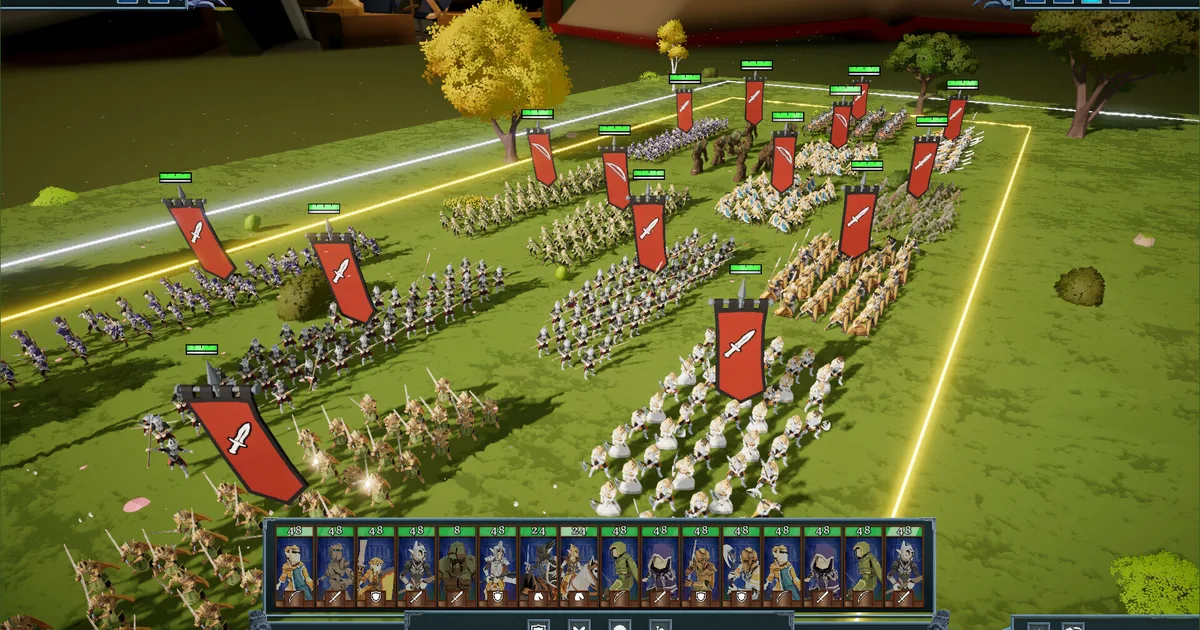
- Hover outlines, facing arrows, glowing deployment edges, ranged cones, smoother zoom, and morale warnings make battles easier to read.
- Master, Voices, Effects, Interface, and Music now have separate volume sliders, with distance-based sound falloff.
What Happened
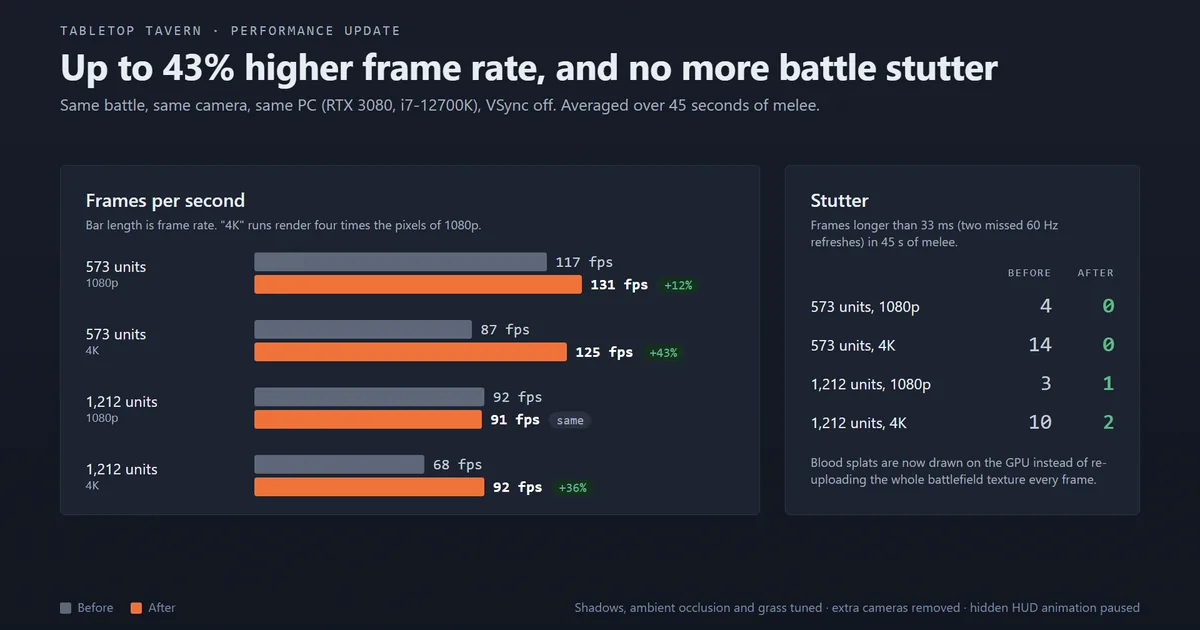
TJ published the patch on Steam on September 20. The accompanying performance chart gives the headline some useful shape: in a 573-unit test, the graphic shows 1080p moving from 117 to 131 frames per second and 4K moving from 87 to 125. A larger 1,212-unit test shows 4K moving from 68 to 92 frames per second, while 1080p stays roughly flat. The notes also say the old melee stutter is gone, and new anti-aliasing and FPS-limit options are available in Graphics.
The most practical new tool is locked formation. Click the padlock on a group bar or press Ctrl+G to keep the block's shape and facing while you move it. Dragging turns the whole group, everyone marches at the pace of the slowest unit, and an attack order spreads the squads across the enemy line. That gives players a way to reposition a formation without rebuilding it after every turn.
The battlefield now gives more information at a glance. Hovering a squad outlines it in gold or red, selected groups stand out more clearly, arrows under units show their facing, and deployment zones and battlefield edges glow. Ranged units show their full attack cones, while the old range lines no longer cover units and banners. The patch also adds a smoother zoom and a Camera Zoom Speed slider.
Auto-resolve gets a less visible but important correction. Hero bonuses now count, and melee uses the same hit roll as a fought battle. That should make the result less generous in early Overlord encounters, where the previous calculation could turn a dangerous battle into an almost automatic win. The full changelog also lists fixes for a victory-screen lock, campaign-map row locking, swamp movement speed, hero and faction bonuses, custom battle weather, modded hero traits, and several lore and localization issues.
Why It Matters
This is a performance patch with a control change attached. Faster battles matter most when the army grows, but formation lock addresses the other strain in a large real-time fight: keeping a line intact while the player reads the next threat. It should be especially useful alongside the positioning advice in our Tabletop Tavern advanced strategy guide, while the complete Tabletop Tavern guide remains the broader reference for factions and progression.
The readability additions are easy to underestimate. A gold outline, a facing arrow, and a visible ranged cone answer different questions during the same few seconds. Players can see which squad they are about to move, whether a formation is turned correctly, and what its ranged units can cover. Our Tabletop Tavern faction guide and beginner tips guide cover the army choices that still matter after the interface gets clearer.
The update also lands as the solo developer settles into full-time development. In the prior September 15 post, TJ wrote, "This week I was able to quit my day job. Tabletop Tavern is my full time job as of today." The release-date coverage has the earlier launch context, and our Tabletop Tavern review explains why the battle scale made performance such a consequential part of the pitch. For a wider roguelike strategy comparison, see the best roguelike games of 2026 and the Deep Rock Galactic: Rogue Core hub.
Frequently Asked Questions
What does Tabletop Tavern update 1.9.20 change?
The September 20 patch improves performance, adds locked group formations, makes battles easier to read, changes auto-resolve math, adds audio sliders and distance falloff, and fixes several campaign and battle bugs.
How much faster is Tabletop Tavern update 1.9.20?
The official notes say battles run up to 43% faster at 4K and around 12% faster at 1080p. The patch also removes the stutter during melee and adds anti-aliasing and FPS limit options.
How do locked formations work in Tabletop Tavern?
Click the padlock on a group bar or press Ctrl+G. A locked group keeps its shape and facing while moving, marches at the pace of its slowest unit, and spreads squads across the enemy line when attacking.
Did auto-resolve change in the 1.9.20 update?
Yes. Auto-resolve now includes hero bonuses, and its melee calculation uses the same hit roll as a fought battle. Early Overlord battles should no longer be near-guaranteed auto-resolve wins.
What is Tabletop Tavern's current Steam price?
The live US Steam listing shows Tabletop Tavern at $19.99 with no active discount in the September 25, 2026 check. It is a single-player Windows PC game and has a free demo.
References
- Official Update 1.9.20 post on Steam, published September 20, 2026.
- Official Update 1.9.15 post on Steam, including TJ's full-time development announcement.
- Tabletop Tavern on Steam, checked for current price, platform, and status.
- Tabletop Tavern official announcement trailer from TJGameDev.
About the author

News Editor
News editor covering indie and mid-tier PC game launches, patches, and developer announcements. British, based in Manchester.
- 9 years games journalism
- 1,400+ news articles published
- Specialist in launch-day and patch-day coverage
- Verifies every claim against a primary source before publishing
Keep reading
Disclaimer
This article is published for informational and entertainment purposes. It does not constitute professional financial, legal, or technical advice. Game performance, online services, patch schedules, and store listings change. Verify critical details (pricing, system requirements, regional availability) with publishers and storefronts before you buy. Affiliate links, where present, help support our editorial work and are labelled in our affiliate disclosure.
Comments
Loading comments…