
GuideSteam
Steam Remote Play Together: Play Local Co-op Online
One copy, one host PC, up to four players. The steps are short; the catch is which games carry the flag and what breaks the stream.
VerdictUse Remote Play Together for games Steam lists as local-only, and let a game's own online co-op win whenever it has one. The host's PC and wired network decide how it feels.
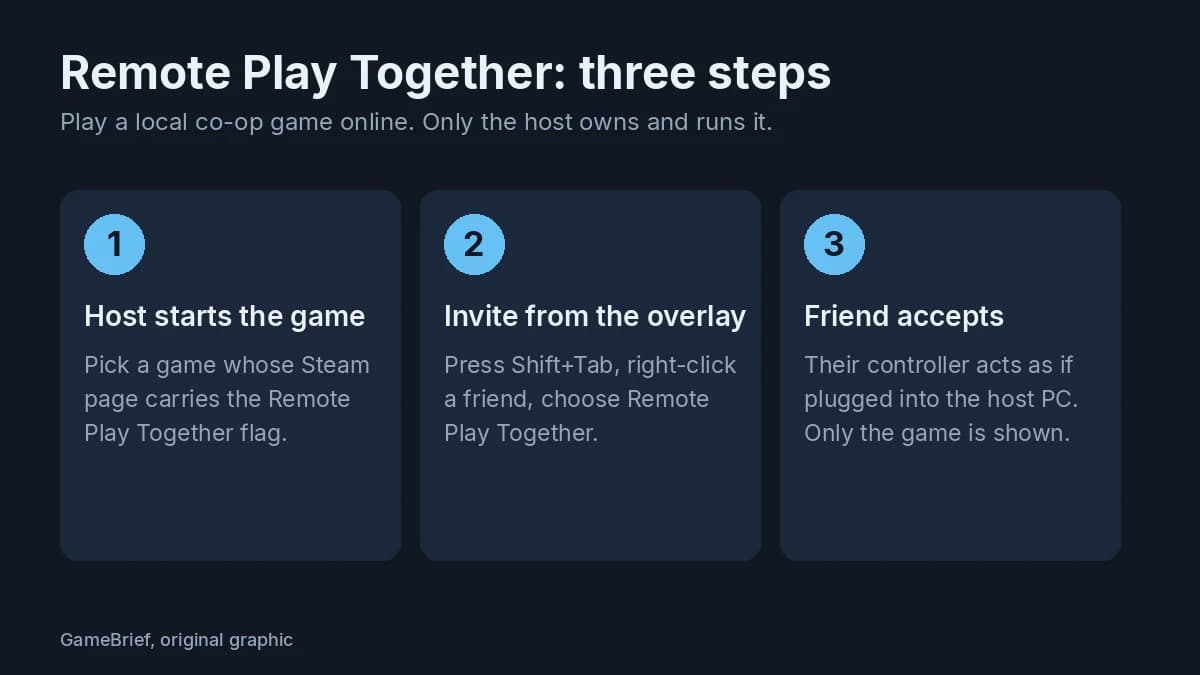
Steam Remote Play Together fits one situation: your friend lives three time zones away, you both want to play Cuphead, and the game has only the kind of co-op you play on one couch. Steam's own description is that one player owns and runs the game, then up to four players, or more with fast connections, join over the internet. Everyone else needs no copy of the game.
Sponsored

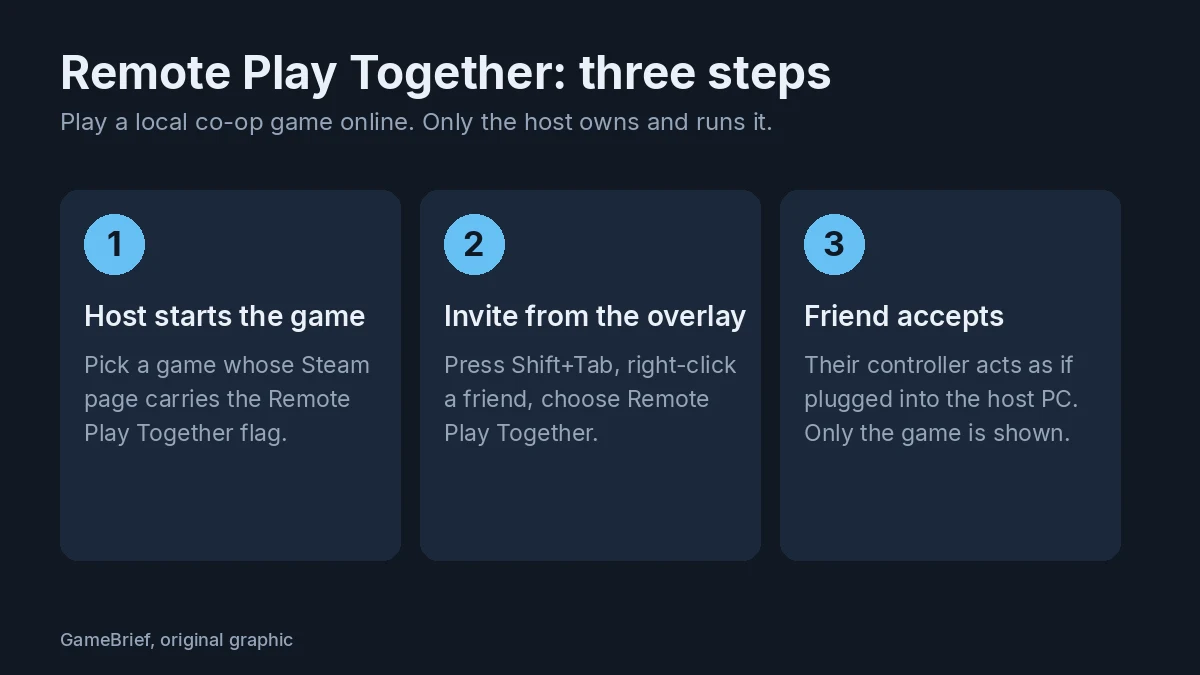 Chart: GameBrief, original graphic. Source: Valve Steam Remote Play page and support FAQ.
Sponsored

Who needs it, and who should skip it
The host's PC does all the work, and Steam streams the picture to everyone else. Valve says the system streams video, audio and voice between players. That's why the host's hardware and network decide how good it feels, and why it's the wrong tool when a game already has its own online co-op. Our view: when a game offers its own online co-op, use that instead. Everyone runs the game on their own PC and only game data crosses the internet, so a weak host PC isn't the group's problem.
Remote Play Together earns its place when a game is local-only, or when only one of you owns it. Our best co-op games of September list is full of titles with real online modes, and so are the Risk of Rain 2 co-op guide and the Sunderfolk online co-op guide. Those don't need streaming.
Start a session in four steps
Valve's support page gives the order:
- Start the game on the host PC.
- Make sure your friend is logged in to Steam on a supported device.
- Press Shift+Tab to open the Steam overlay, right-click your friend in the friends list and choose Remote Play Together.
- Your friend accepts the invite and is in the game with you.
Each player uses their own controller. Valve says the host can share or limit keyboard and mouse access, and from the November 17, 2025 client update the input toggles in the Remote Play Together dialog stay saved per game. The same update made mouse cursor sharing give priority to the local player.
Phones work too. A friend on mobile accepts the invite in the Steam Chat app, and the game then opens in the Steam Link app. Since March 2021 you can also send a link to someone with no Steam account, and Valve says no account is needed to join from Windows, Mac OS, Linux, iOS or Android. Valve's page also states that Remote Play Together is not supported for VR.
How many games carry the flag
The store page of a supported game lists Remote Play Together in its details. We counted what Steam's store search returns for games only, US store, on November 10, 2026:
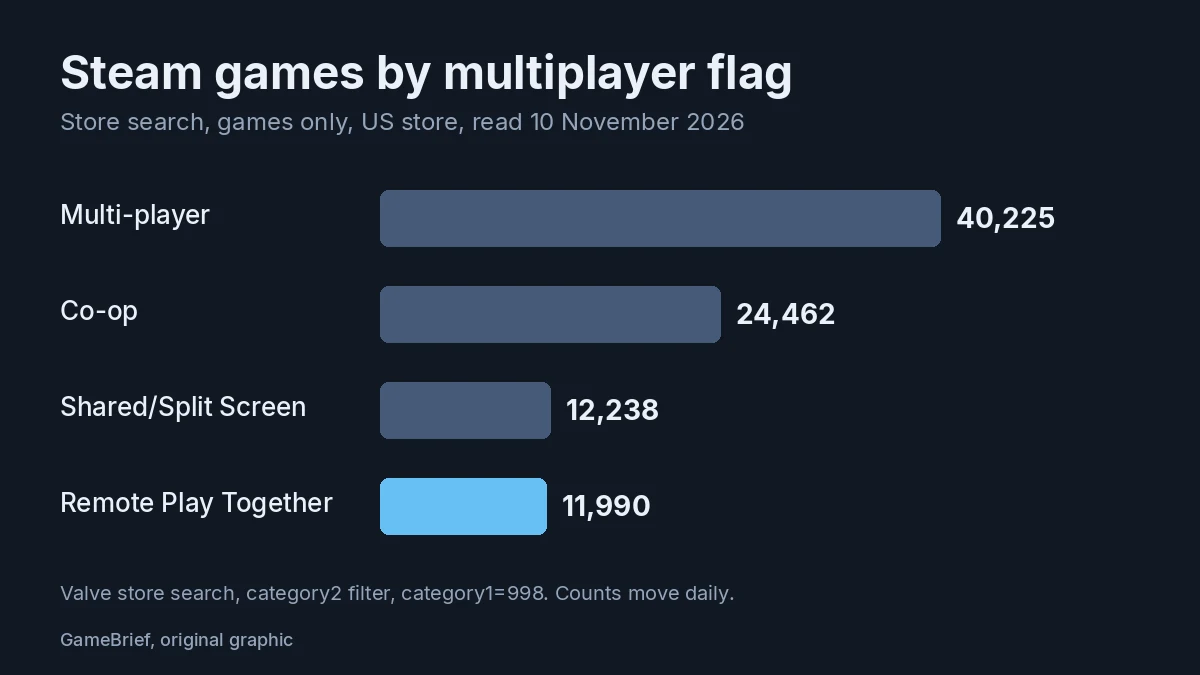 Chart: GameBrief, original graphic. Source: Steam store search, read November 10, 2026.
The flag sits on 11,990 games, nearly three in ten of the 40,225 tagged Multi-player and about half as many as the 24,462 tagged Co-op. It is also close to the 12,238 tagged Shared/Split Screen, which fits: the flag covers games with local multiplayer. The counts move daily.
A few games, read from Steam's store data the same day:
| Game | Steam lists | Best way to play online |
|---|---|---|
| Cuphead | Shared/Split Screen Co-op, Remote Play Together | Remote Play Together |
| Castle Crashers | Online Co-op, Shared/Split Screen Co-op, Remote Play Together | Its own online co-op |
| Stardew Valley | Online Co-op, Shared/Split Screen Co-op, Remote Play Together | Its own online co-op |
| Valheim | Online Co-op | Its own online co-op; no flag |
Cuphead is the clean case. Steam lists no online mode for it, only the flag. The Over the Hill co-op guide and the Far Far West co-op guide cover games with their own online co-op, where checking the page for Online Co-op first saves the stream. The October Next Fest co-op demos are worth the same check, and our note on whether Next Fest demos expire tells you how long you have.
Fix lag, silence and dead controllers
Google Autocomplete on November 10 offered "not working", "lag", "controller not working", "no sound" and "mouse not working" after the feature name.
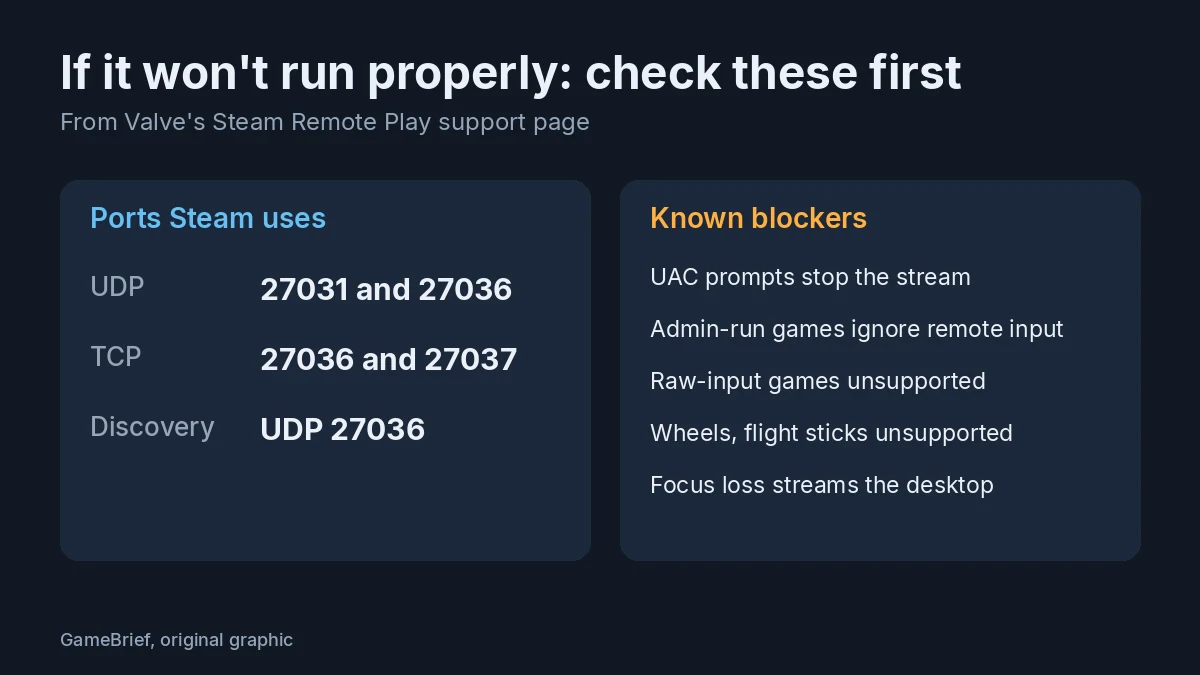 Chart: GameBrief, original graphic. Source: Valve Steam Remote Play support FAQ.
- For lag, Valve recommends a quad-core CPU on the host and a wired network. It says powerline and good wireless N or AC have worked for some people, though results vary. In the game, lower the resolution and turn off vertical sync. In Steam's Remote Play settings you can trade speed against quality, cap bandwidth and lower the maximum capture resolution.
- If it won't connect, note that Steam streams over UDP 27031 and 27036 and TCP 27036 and 27037, and Valve asks you to let Steam listen on those in your firewall.
- If the mouse or keyboard does nothing, some games need to run as administrator, and Windows blocks remote input to them. Valve names Age of Empires 3, The Bard's Tale and Nether, so check whether yours is set to run that way.
- If a controller is dead, Valve says DirectInput controllers other than gamepad style ones, such as wheels and flight sticks, don't work, and neither do games that use raw input.
- If the stream stops or shows the desktop, UAC prompts stop streaming, and if the game loses focus Steam streams the desktop so you can get back to it. Keep the game in front.
- On voice, Valve says voice recording over streaming is not supported. Use Steam voice chat or Discord on each player's own machine.
- On sound, Valve fixed a regression in Remote Play Together audio capture in its December 3, 2024 client update, so update the host's client first.
To see where it hurts, press F6 during a session for live stats, and F8 to save a screenshot with 10 seconds of stats.
Keep it to people you know
Remote Play Together is a friend-list feature, and Valve's step is "right-click your friend". Keep it there. In a r/Steam thread from November 1, 2026 about accepting game invites from strangers, one commenter put it bluntly: "Talking to someone who randomly added you? Scam 99.9% of the time." Another wrote that many multiplayer games have unpatched vulnerabilities that let one player infect another. That thread is about random invites, not about Remote Play Together, so treat it as a reason to be careful who you invite.
If your host will be a Steam Deck or another handheld, our Moonlighter 2 Steam Deck settings piece shows what that class of hardware manages. For groups larger than four, the Romestead 8-player co-op guide covers a game with eight-player support built in.
What we can't tell you yet
Valve gives no measured latency for Remote Play Together, so we can't say how many milliseconds a four-player session adds, and we ran no timing test of our own. The "or even more" in Valve's player count has no stated cap. Valve's October 13, 2026 client update added an experimental video codec called Pyrowave for high bandwidth, low latency streaming, and its October 21 update fixed a memory leak in NVENC H.264 streaming on Windows at unlimited bandwidth. We found no Valve statement on whether either changes Remote Play Together sessions, so treat them as unknowns.
Checked on November 10 against Valve's Remote Play page, its support FAQ, its Steam news posts and client update notes, the Steam store search and the r/Steam thread.
References
- Steam Remote Play, Steam store: player count, controllers, step list, VR note
- Steam Remote Play FAQ, Steam Support: steps, hardware and network advice, ports, known issues, F6 and F8
- Introducing Steam Remote Play Together, Steam news (October 21, 2019): beta announcement, local co-op focus
- Introducing Steam Remote Play Together, Steam news (November 20, 2019): full release, mobile apps
- New! Invite anyone to join your game with Steam Remote Play, Steam news (March 22, 2021): invite by link, no account needed
- Steam Client Update, November 17th, Steam news (2025): per-game input toggles, cursor sharing
- Steam Client Update, December 3rd, Steam news (2024): audio capture fix
- Steam Client Update, October 13th, Steam news (2026): Pyrowave codec
- If you are asked to play an unknown game on Steam from someone you recently met, Decline!, r/Steam (November 1, 2026): community warnings
Was this guide helpful?
About the author

News Desk
GameBrief's byline for industry news, patch notes, studio announcements and esports results. Tight sentences, dated facts.
- News, patch notes and early access
- Industry and esports results
- Sources listed per article
Keep reading

Beyond The Dark malware: Valve removes free horror game
General · 5 min

Games Like It Takes Two and Split Fiction: 7 Co-op Picks
Features · 12 min

Jackbox Party Pack 12 Games: Player Counts and How to Play
Guides · 11 min

Minecraft Dungeons 2 Co-op Guide: Couch, Online, Crossplay
General · 6 min
Best Co-op Games to Play Right Now in September 2026
Features · 11 min
Is Helldivers 2 Worth It? What Players Say in 2026
Guides · 9 min
Sponsored
More game deals
Disclaimer
This article is published for informational and entertainment purposes. It does not constitute professional financial, legal, or technical advice. Game performance, online services, patch schedules, and store listings change. Verify critical details (pricing, system requirements, regional availability) with publishers and storefronts before you buy. Affiliate links, where present, help support our editorial work and are labelled in our affiliate disclosure.