
GameBrief · General
Graveyard Keeper 2 Zombie Army Battle Guide Explained
Reviewing
Graveyard Keeper 2
Lazy Bear Games · tinyBuild
Graveyard Keeper 2 zombie army battles start at a guard post, not from the Town map or a generic combat menu. You need the right weekly window, a sword and armor for your own fighter, enough defense power from Barracks structures and squads, and a plan for the battle's waves or control points. This guide covers the current PC build's verified battle flow, including how squads use weapons, what barricades contribute, why the Victory Banner matters, and what a defeat actually costs.
The sequel's official combat post explains the broad design: Town fights happen in the streets, each area has its own objective, and you can position squads or raise a banner to lead them yourself. The details below combine that post with the current mechanics and battle references, while calling out places where older pages are contradicted by the 1.006 and 1.007 patches.
TL;DR: Check the weekly calendar, bring armor and a sword to the guard post, then meet the defense-power requirement shown in the battle window. Build barricades or towers at the Barracks and tick compatible zombie or mercenary squads. During the fight, hold your base flags through every wave. Winning pays battle rewards and now gives zombies red tech points; losing costs consumable potions, not your stored items or money.
Graveyard Keeper 2 zombie army battles: quick answer
To start a battle, arrive at its guard post during the available weekday with armor and a sword on your toolbar. The game checks defense power from your Barracks structures and selected squads. Once the fight starts, use your sword or bow, protect your base flags, and survive the listed waves. Some battles ask you to capture control points instead of simply holding one position.
Graveyard Keeper 2 zombie army: key takeaways
- Town or city battles have a weekly window. Current mechanics references identify the regular town battle window as Sloth, while the official combat post describes it more generally as a certain weekday.
- The battle window shows the defense power you need before the start button becomes available.
- Defense power comes from Barracks barricades and towers plus the squads you have selected.
- A zombie fighter needs armor and a pike or bow. A zombie cannot use a sword, and the battle uses a copy of the zombie.
- Victory Banners pay for Barracks building-area extensions. They are rewards from specific battles, not a permanent damage bonus.
- The clock stops during a battle, and a defeat can be retried. You lose consumed potions and the reward, but not your stored items or money.
- Official updates 1.006 and 1.007 changed the old reward picture: zombies now earn red tech points for winning fights.
Overview: what the zombie army battle system actually checks
The official Graveyard Keeper 2 Steam page sells the army as part of the wider Town loop, alongside zombie production, machinery, and fortification. That is the right mental model. A battle is not a separate action game bolted onto the graveyard. It is a scheduled pressure test for the defensive work you have already done.
That production-to-defense relationship is familiar to players coming from games such as Subnautica 2's base-building guide. The important difference here is that Graveyard Keeper 2 attaches a weekly appointment and a battle objective to the construction loop. Readers tracking the sequel's systems can also use the Graveyard Keeper 2 achievements guide for its separate Steam checklist.
The official combat development post makes three important points. Town fights occur in ordinary streets rather than special arenas, different parts of Town use different objectives, and defensive materials can become barricades and towers. It also shows the two ways to use squads: position them where you need them, or raise their banner and lead them yourself.
The current battle reference describes a more specific entry sequence. You go to a guard post, arrive on the correct day, and meet the defense requirement displayed by the battle window. The clock is frozen while the fight runs. A sewer brawl is a useful exception: the official post describes the sewers as open six days out of six, and the current reference notes that sewer fights do not use the same barricade and tower setup as the street battles.
This page is deliberately narrower than our Graveyard Keeper 2 automation guide. That article explains why zombie labor, factories, and the army belong in one production loop. Here, the concern is the fight itself: the start check, defense power, squad equipment, objectives, rewards, and losses.
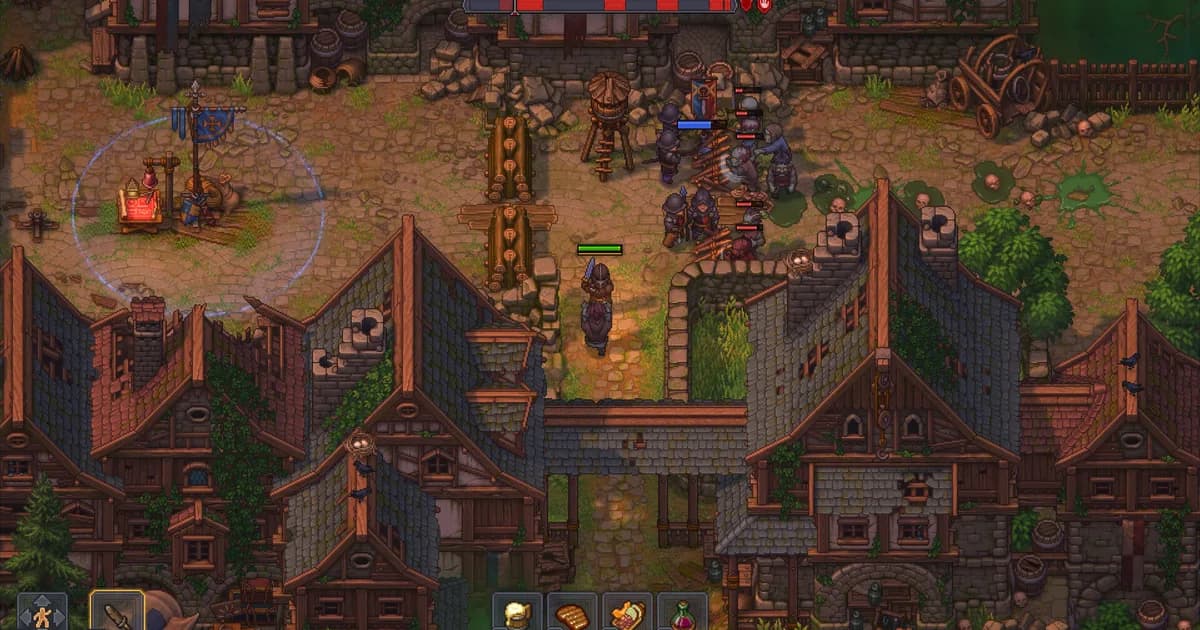
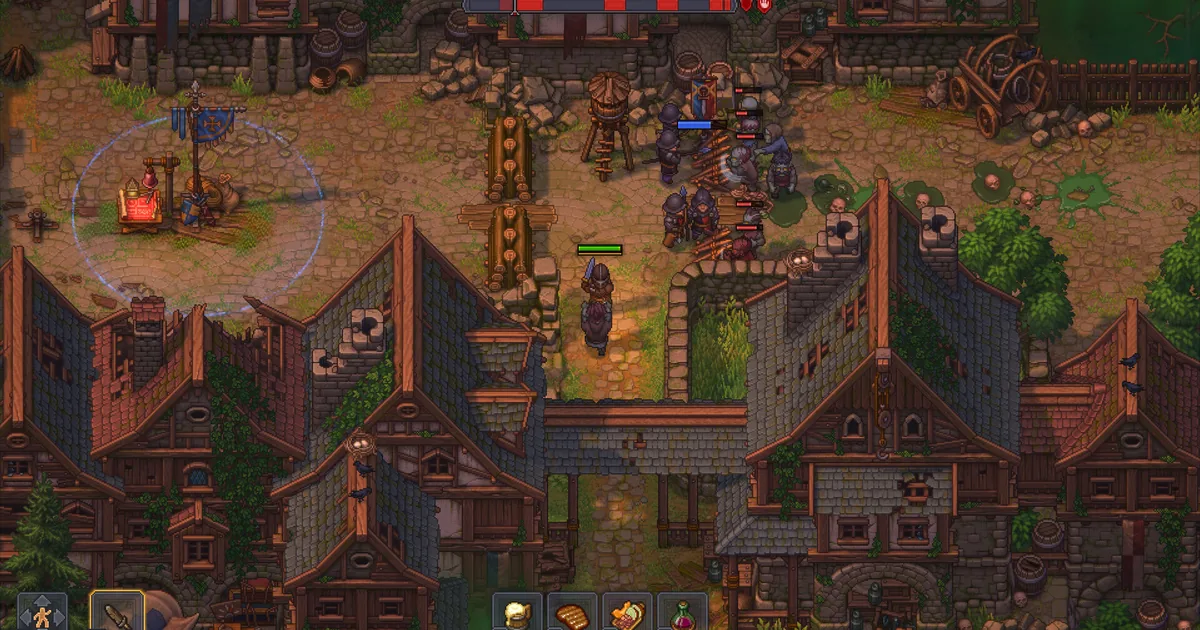 The street battle view shows the blue base banner, defensive structures, incoming enemies, and a wave timeline across the top.
GODEEPER: If your army is still waiting on production, use the Graveyard Keeper 2 Automation Guide: Build Smarter for the factory and zombie-worker loop.
Step-by-Step: how to start and win a zombie battle
Check the calendar before carrying equipment
1. Check the calendar before carrying equipment: Town fights do not run whenever you reach the guard post. The official combat post says city battles are available on a certain day of the week. The current calendar and combat references identify the regular battle window as Sloth. Treat that as a scheduled appointment, not a random encounter.
The same planning rule applies to sewer fights, although their availability is broader. Do not spend a rare potion or drag a full squad across Town before checking the calendar wheel. If the post will not offer the battle, the missing requirement is probably timing, not weapon quality.
Put armor and a sword on your own toolbar
2. Put armor and a sword on your own toolbar: The battle start check is stricter than the list of weapons you can use once the waves arrive. You need armor and a sword on your toolbar to start a battle. A bow alone is not enough, even though a bow is useful once combat is underway.
This requirement is for your character. It is separate from the equipment inside a zombie squad. Keep the player sword accessible, then decide whether you will personally use the bow during the fight. The safest preparation is to arrive with the sword already placed and the armor equipped instead of trying to repair the toolbar at the guard post.
Read the defense-power requirement
3. Read the defense-power requirement: Interact with the guard post and read the battle window before committing. It shows the squad count and the defense power requirement. You cannot start until the total reaches the displayed threshold.
The total has two parts in the current battle reference:
- The quality of the barricades and towers built through the Barracks.
- The power of the squads you have selected for this fight.
That makes the start screen a planning tool. If you are short, adding a random weapon to your inventory will not solve the problem. Improve a Barracks structure, add a compatible squad, or use a mercenary where the battle allows it.
Build the defensive pieces before starting
4. Build the defensive pieces before starting: Use the Barracks build table to make barricades and towers before you return to the guard post. The official combat post confirms that you spend materials on these defenses, and the current reference says their quality is included in the defense-power total. The structures are then placed on the street battlefield for the fight.
There is a practical reason to build early. Preparation time is frozen once combat begins, so you cannot use the battle clock as a calm construction phase. Build, inspect, and adjust before clicking the start option. Sewer brawls are the exception described by the current reference, because they do not use the same street structures.
The technology tree makes the preparation order visible. The screenshot below shows Simple Weapons and Simple Barricades as separate early research nodes, which is a useful reminder that your player kit and your defensive kit are related but not identical unlocks.
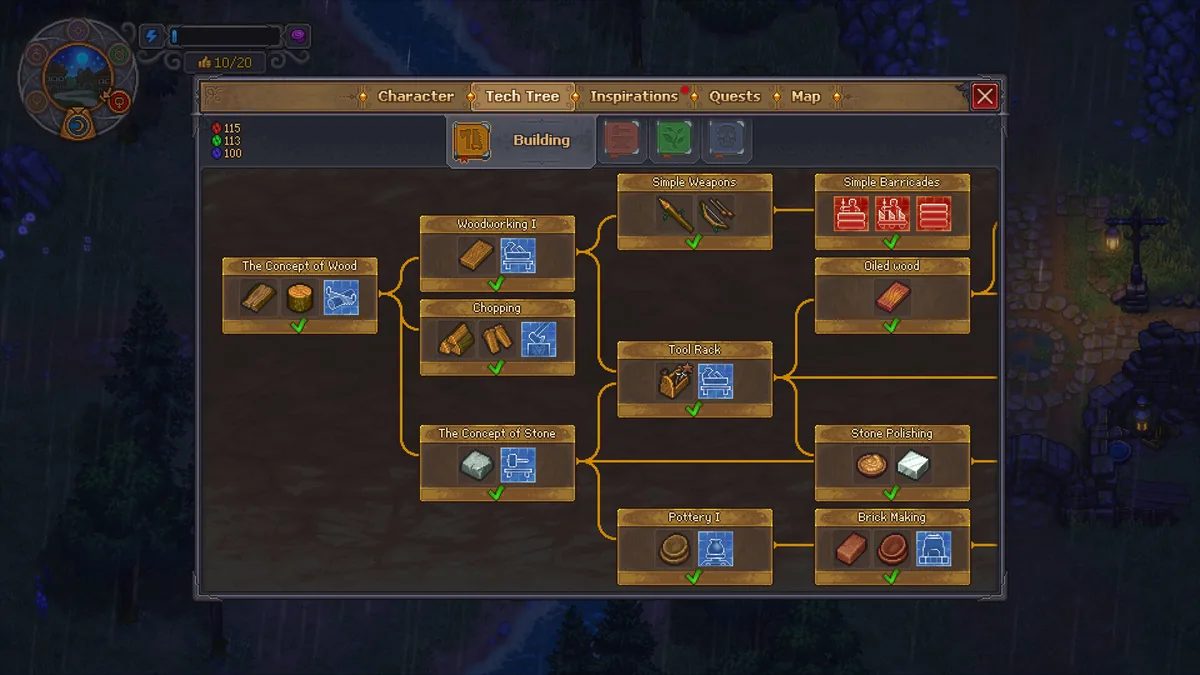 The technology tree separates Simple Weapons from Simple Barricades, so prepare both sides of the battle plan.
For a wider look at placement and production space, the Graveyard Keeper 2 Factory Layout Guide is the natural companion. The same habit matters here: leave enough room to inspect the system before filling every available tile. If you are deciding where a defensive expansion belongs, the Outbound best base locations guide gives another example of planning around routes instead of empty ground.
Select squads and confirm their weapons
5. Select squads and confirm their weapons: The battle system treats a squad as a selected group that contributes power and can fight on the field. The current mechanics reference describes four squad slots unlocked through Defender's Emblems. Hand an emblem in at the Barracks when you have one, then use the resulting slot for a zombie fighter or a paid mercenary.
For a zombie squad, place the zombie in the Barracks slot and equip armor plus a compatible weapon. The verified mechanic is specific: a zombie cannot hold a sword. It needs a pike or a bow and armor before it can fight. Squad power is based on weapon and armor quality, so the battle window is more useful than a vague “strong zombie” label.
The battle uses a copy of the zombie. If that copy dies, the original zombie is not lost. That makes squad testing less frightening than it first appears, although it does not make a low-power group a good choice for a high defense threshold.
Mercenaries work differently. The current battle reference describes paid fighters who occupy a squad slot and whose payment covers one won battle. Use them to reach a requirement or fill a weak roster, but remember that their cost and slot usage are part of the decision. They are not free extra bodies that sit outside the squad limit.
Start the fight and read its objective
6. Start the fight and read its objective: Return to the guard post on the correct day, confirm that the defense total reaches the requirement, and start the battle. The game does not use one universal arena rule. The official post gives two useful examples:
- Town Square asks you to hold off waves arriving from multiple directions.
- Central streets can send pressure along multiple fronts while you capture control points.
Look for the base flags and the battle timeline. The current reference says you win after the last wave when your base flags are still yours. You do not need to kill every enemy on the screen. If the objective uses control points, move the fight forward instead of standing beside the first barricade and waiting for every enemy to disappear.
The street placement view can look busy before you understand what matters. Green and red build tiles, rotation controls, and blocked spaces are visible in the general building interface. The image below is not a battle map, but it illustrates why a little space around the structures makes a plan easier to read.
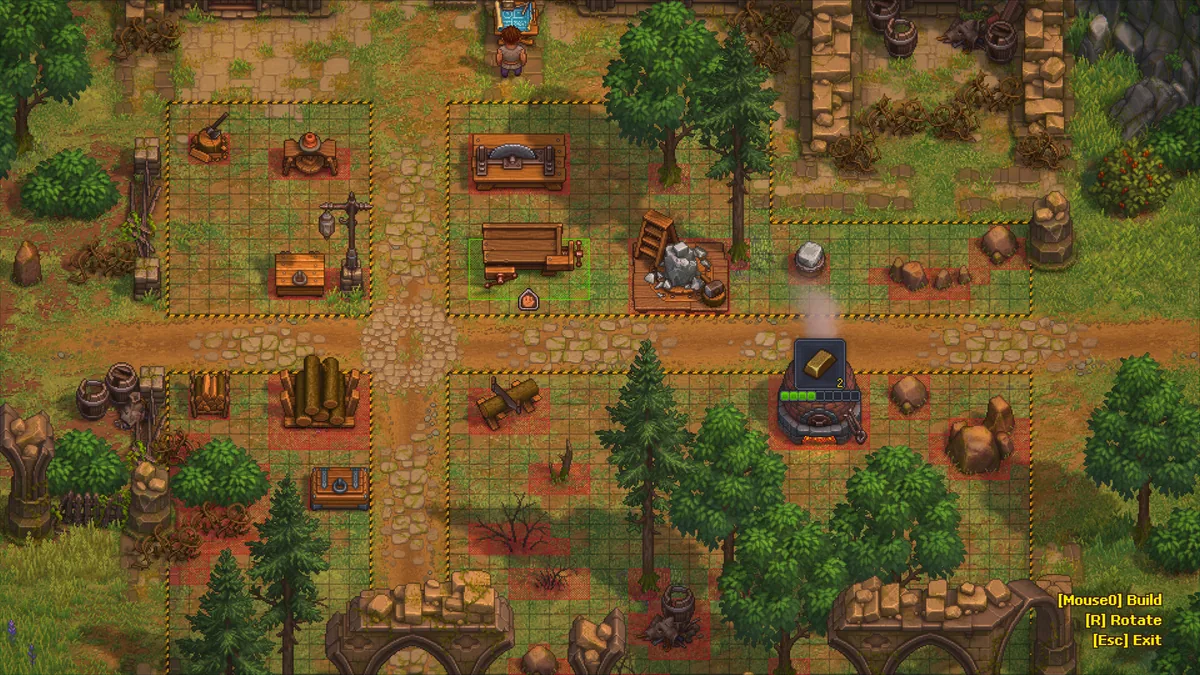 The placement grid shows how buildable and blocked tiles compete for space, a useful constraint to remember before defensive construction.
Hold the flags through the final wave
7. Hold the flags through the final wave: The win condition is not simply “damage the biggest enemy.” Hold your base flags, follow the objective shown by the battle, and keep enough fighters alive to cover the fronts the map creates. The current reference says the fight ends after the last wave if all base flags remain yours; remaining enemies fall when the timeline is complete.
If your character is knocked out or the enemy takes the base, the battle is lost. The clock stopping during the fight means you can focus on the encounter without losing a day outside it, but it does not pause consumable use or repair a damaged plan.
Collect the reward and reset your plan
8. Collect the reward and reset your plan: After victory, collect the reward at your feet. The battle references list Town Gratitude, zombie goo, Defender's Emblems, Victory Banners, and keys among the reward types, depending on the fight. The exact reward is not universal, so do not start a battle expecting a banner every time.
There is one important current-build correction to older references. Official updates 1.006 and 1.007 say zombies now earn red tech points for winning fights. That is separate from the item reward that drops after the battle. If a pre-launch or early wiki page says zombie combat gives no tech points, it is stale on this point.
Zombie squads, weapons, barricades, and Victory Banners
Zombie squads are Barracks teams that add defense power and fight on the field, while barricades and towers raise the defensive total before the fight. The equipment rules are deliberately separate: your character needs a sword to pass the start check, but a zombie needs armor plus a pike or bow. Victory Banners expand the Barracks instead of improving a squad directly.
Zombie weapons are not player weapons
The easiest equipment mistake is assuming that a zombie can use whatever the player can carry. The current reference says the zombie fighter uses a pike or bow plus armor, and specifically cannot hold a sword. Your own sword is the entry requirement for the battle; it is not the weapon you hand to the zombie.
The official combat post also gives useful formation examples. It mentions all-archer squads, spiked barricades, and combat potions as possible tools. That does not mean every battle should be built around archers. It does show that weapon choice, structure choice, and consumables are intended to work together.
Barricades and towers buy time and defense power
Build barricades and towers at the Barracks build table, then use the battle window to see how their quality changes your defense total. The official post describes them as materials that become battlefield defenses. The current reference adds that the structures are counted from the Barracks before the fight and set out on the battlefield when combat begins.
The practical choice is not “build the most things possible.” It is “reach the requirement while leaving the field readable.” Spiked defenses and archer towers can make a front easier to hold, but a crowded or poorly planned setup still leaves your squad in the wrong place when pressure splits across several fronts. The best base-building colony sim games round-up is useful genre context for that space-versus-output tradeoff, while Palworld base defense offers a different example of preparing a settlement for attacks. A separate Palworld mining-base guide is useful for the same reason: a base has to serve movement and production, not only defense.
Defender's Emblems and Victory Banners have different jobs
Do not confuse these two rewards. A Defender's Emblem unlocks a squad slot when you hand it in at the Barracks. A Victory Banner pays for one extension of the Barracks building area. The current item reference lists three banner rewards from specific battles, so the banner is an expansion resource rather than a weapon upgrade.
That distinction changes the order of your goals. If the battle window is blocked because you lack squad power, an emblem can solve a roster problem. If you are running out of room for defensive pieces, a banner solves a construction-space problem. Neither reward replaces the need to bring a player sword and armor to the guard post.
GODEEPER: Once you understand the defense footprint, the Graveyard Keeper 2 Factory Layout Guide shows how to plan crowded production spaces without losing inspection access.
Tips for cleaner zombie army battles
The cleanest battle preparation is calendar-first, threshold-driven, and reversible. Check the Sloth window, meet the displayed defense requirement, test a compatible squad, and reserve potions for the objective that is actually failing. This approach keeps a single rough battle from turning into a week of rebuilding.
Treat Sloth as a weekly appointment
Keep the calendar in mind while your factory is running. The official post confirms a weekday restriction for city battles, and the current calendar reference maps it to Sloth. Use other days for research, hauling, production, or preparation instead of waiting at the guard post.
Build for the displayed threshold, not an imaginary perfect army
The defense-power requirement is visible before you start. Meet that number with the cheapest reliable mix of structures and squads, then spend the rest of the day improving equipment. A huge army is not automatically better if the actual objective is a narrow control-point push.
Keep the player kit separate from the squad kit
Your sword gets you through the entry check. The zombie's pike or bow and armor determine whether that squad can contribute. Check both inventories before you leave the Barracks. This small separation prevents the classic “I brought a bow, why will the battle not start?” problem.
Use copies to test a squad, but do not waste a window
Because the battle uses a copy of a zombie, you can learn how a squad performs without risking the original worker. Still, the battle is tied to a weekly window for Town fights. If the defense number is clearly too high, improve the squad or Barracks before spending the attempt.
Save potions for the objective you are actually failing
The combat post lists combat potions alongside weapons and structures. Use one when it answers a real problem, such as losing a control point or failing to cover a second front. A potion will not fix a missing armor requirement or a battle that is closed because it is the wrong day.
Design the next Barracks extension before spending a banner
A Victory Banner pays for one building-area extension. Look at where your barricades, towers, build table, and squad work happen before claiming the expansion. The wider Valheim base-building guide makes the same general planning point in a different game: future access is cheaper to reserve than to reconstruct.
The Subnautica 2 advanced base-building guide takes the same idea further by treating expansion space as part of a working route, not leftover decoration.
Let automation support the army, not replace preparation
The wider production loop matters because zombie workers and factories can keep materials moving, but the official sources do not publish a universal recipe for a battle-ready army. Use the best indie automation and logistics games guide for genre comparisons, then trust the live battle window for the actual defense requirement in your save. The Shapez 2 automation guide and All Hail the Orb automation guide are useful reminders that readable throughput matters more than a screenshot full of machinery. The Outbound energy management guide is another useful comparison for turning a limited resource budget into a stable route instead of a last-minute correction.
Common mistakes in zombie army battles
Most failed attempts come from preparation mismatches rather than a hidden damage check. Players arrive on the wrong day, bring a bow without the required sword, give a zombie the wrong weapon, or protect a wave while ignoring the base flags. Each mistake has a specific correction.
Arriving with a bow but no sword
A bow is a valid player weapon during combat, but the current start check requires armor and a sword on the toolbar. Put the sword there before interacting with the guard post.
Treating every day as a battle day
Town battles are scheduled. The official wording is “a certain day of the week,” and current mechanics references identify the regular window as Sloth. If the guard post is quiet, check timing before dismantling your Barracks.
Giving a zombie a sword
Zombie equipment is not a copy of the player loadout. The current reference says zombie fighters use a pike or bow and armor, not a sword.
Assuming the battle ends when the screen is empty
The current win condition is tied to the wave timeline and your base flags. You do not need to chase every remaining enemy, but you do need to hold the base through the final wave. Control-point battles add movement to that requirement.
Repeating an old “no tech points” rule
Official updates 1.006 and 1.007 changed this. Zombies now earn red tech points for winning fights. Do not carry the older wiki wording into a current-build plan.
The same patch-first habit helps in other early-access survival systems. The Romestead survival tips guide is a broader example of checking the live rules before committing to a resource route.
Spending a Victory Banner like a combat consumable
The banner pays for Barracks building-area expansion. It does not replace a squad, weapon, or potion. Hold the construction decision until you know where the extra space will help.
Frequently Asked Questions
How do you start a zombie army battle in Graveyard Keeper 2?
Go to the battle guard post on its available weekday with armor and a sword on your toolbar. The battle window then checks your defense power from Barracks defenses and selected squads before it lets you begin.
What weapons can Graveyard Keeper 2 zombies use?
A zombie fighter needs armor and either a pike or a bow. The current mechanics reference says a zombie cannot hold a sword, while your own sword or bow is used separately during the battle.
How do zombie squads work in Graveyard Keeper 2?
Place a zombie in a Barracks squad slot, give the fighter armor and a compatible weapon, then tick the squad before starting. Squad power contributes to the defense requirement, and the battle uses a copy of the zombie.
What does the Victory Banner do in Graveyard Keeper 2?
A Victory Banner pays for one extension of the Barracks building area. The current battle reference lists three banner rewards, so the banner is a construction reward rather than a general combat buff.
How do you build barricades in Graveyard Keeper 2?
Use the build table in the Barracks to make barricades or towers before starting the battle. Their quality contributes to defense power, and the structures are placed on the street battlefield when the fight begins.
What happens if you lose a zombie battle?
You keep your items and money, but consumed potions are gone and the battle gives no reward. You can retry. In a paired battle, losing the second fight sends you back to the first rather than granting the second fight's reward.
Do zombie fights give red tech points?
Yes. Official updates 1.006 and 1.007 say zombies now earn red tech points for winning fights. This current patch behavior corrects older references that said zombie battles did not award tech points.
References
- Graveyard Keeper 2 on Steam: official store description and current platform listing.
- Combat in Graveyard Keeper 2: official development post on street arenas, waves, control points, barricades, towers, squads, banners, and weekly city battles.
- Official 1.006 update: current-build note that zombies should earn red tech points in fights and Defender's Emblems can no longer be destroyed.
- Official Changelog 1.007: current-build confirmation that zombies earn red tech points for winning fights and that quest progression fixes shipped.
- Combat mechanics reference: current community reference for guard posts, defense power, squads, weapons, structures, banners, rewards, and defeat behavior.
- Battles reference: battle start requirements, objective behavior, paired fights, and reward examples.
- Official Graveyard Keeper 2 trailer: tinyBuild's demo launch trailer.
Related Reading
- Graveyard Keeper 2 Multiplayer: Is There Co-op in 2026?: a current single-player check for readers planning their army with others.
- Graveyard Keeper 2 Factory Layout Guide: conveyor planning, workshop spacing, and inspection access.
- Graveyard Keeper 2 review: how Town restoration, automation, and combat fit together in the sequel.
- Best Base-Building Colony Sim Games: broader context for planning space, production, and defense.
- Valheim Base-Building Guide: a separate building game perspective on reserving future access.
Was this guide helpful?
About the author

Senior Critic & Analyst
Former game data analyst turned critic with 11 years covering indie and mid-tier games. Based in Austin. Runs spreadsheets on games most people just play.
- 11 years games criticism
- Former game economy analyst
- Roguelike and strategy specialist
Keep reading
Graveyard Keeper 2 Achievements Guide: All 38 Listed
General · 14 min
Graveyard Keeper 2 Factory Layout Guide: Build Better
General · 20 min
Graveyard Keeper 2 Multiplayer: Is There Co-op in 2026?
General · 15 min

Graveyard Keeper 2 PR Machine Guide: Unlock and Use It
General · 17 min

Graveyard Keeper 2 Release Date, Price, and Platforms
General · 11 min

Graveyard Keeper 2 Calendar and Workshop Hours Guide 2026
General · 13 min

Disclaimer
This article is published for informational and entertainment purposes. It does not constitute professional financial, legal, or technical advice. Game performance, online services, patch schedules, and store listings change. Verify critical details (pricing, system requirements, regional availability) with publishers and storefronts before you buy. Affiliate links, where present, help support our editorial work and are labelled in our affiliate disclosure.
Comments
Loading comments…