
GameBrief · Guides
Subnautica 2 Deep-Sea Base Guide: Power and Co-op Tips

Reviewing
Subnautica 2
Unknown Worlds Entertainment · Unknown Worlds Entertainment
Subnautica 2 deep-sea base techniques are where the game stops being survival and starts being systems management. The Subnautica 2 base building guide covers where to place your first structure and which modules to prioritize in the opening hours. This isn't that guide.
Subnautica 2 deep-sea base play starts once your first base is functional and you're staring at the gap between "a room with a fabricator" and a self-sustaining network that handles deep-sea operations, multi-player workload, and sustained Root Canyon runs. That gap is where most players bleed progress: not because the game is hidden, but because the systems interact in ways the early game never forces you to learn.
TL;DR: Base planning in Subnautica 2 currently comes down to power, placement, and travel time. Solar Panels need useful sky exposure, Hydroelectric Turbines need a current, and Power Transmitters can route generation to a base. The official Early Access material does not establish the hull-depth tiers or exact Root Canyon pressure numbers repeated in older guides. In co-op, four players share the base network, so add storage and a backup source before a long crafting session.
How does a Subnautica 2 deep-sea base work? (quick answer)
- Power: use Solar Panels where sky exposure is useful, Hydroelectric Turbines where a current is available, and Power Transmitters when generation is away from the base
- Connectivity: snap the terminal transmitter directly to the base and test the network after loading or moving a source
- Layout: group storage and fabrication for shorter trips, but do not claim an undocumented adjacency bonus
- A second base is a travel and storage choice, not a required Chapter 1 progression step
- In co-op, plan shared power and storage for four players using the same infrastructure
- Treat exact hull-integrity and depth-tier claims as unconfirmed until the live game or an official note documents them
- Choose a deeper site for safe access, useful resources, and a reliable power route rather than a copied depth number
Current status: September 2026
Subnautica 2 is in Early Access with four-player co-op. Unknown Worlds' current Steam updates document Solar Panels, Hydroelectric Turbines, Power Storage, Power Transmitters, base placement, and fixes for bases losing power displays or turbines stopping after players swim away. Those official notes do not document the hull-integrity meter, reinforced hull tiers, or the exact Sparse Plains and Root Canyon depth bands claimed by older versions of this article. This revision keeps the practical base-planning advice, but marks those inherited mechanics as unverified instead of presenting them as current facts.
Overview: what the basic guide doesn't cover
The first Subnautica 2 base building guide covers the opening loop correctly: build early, Fabrication module first, don't build near Leviathan patrol routes. Solid foundation. What it skips is what happens once that foundation exists and you're trying to run operations at depth. Subnautica 2 deep-sea base strategy is a different discipline from the starting-biome basics.
Three gaps come up constantly in the current Early Access build:
Power connectivity. A generator can be working while the base remains unpowered if a Power Transmitter is not snapped to the base or the connection becomes stale after a save. Check the visible connection and the base display before rebuilding an entire room.
Source choice. Solar is useful where the site has sky exposure. Hydroelectric Turbines need a current, and Power Storage smooths demand spikes. The right answer depends on the site, not on a universal depth threshold.
One-base thinking. A single base is convenient but not mandatory. A forward base can shorten a resource trip and provide storage, while a transmitter network can reduce the need to rebuild a generator at every destination. Treat the number of bases as an operations decision rather than a progression rule.
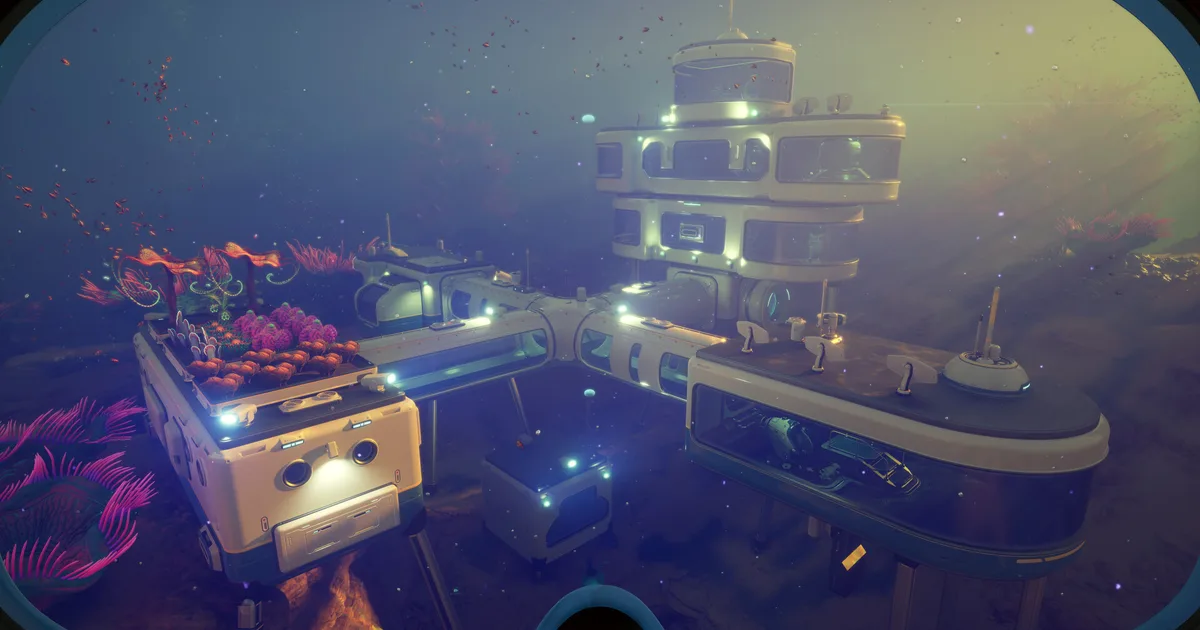
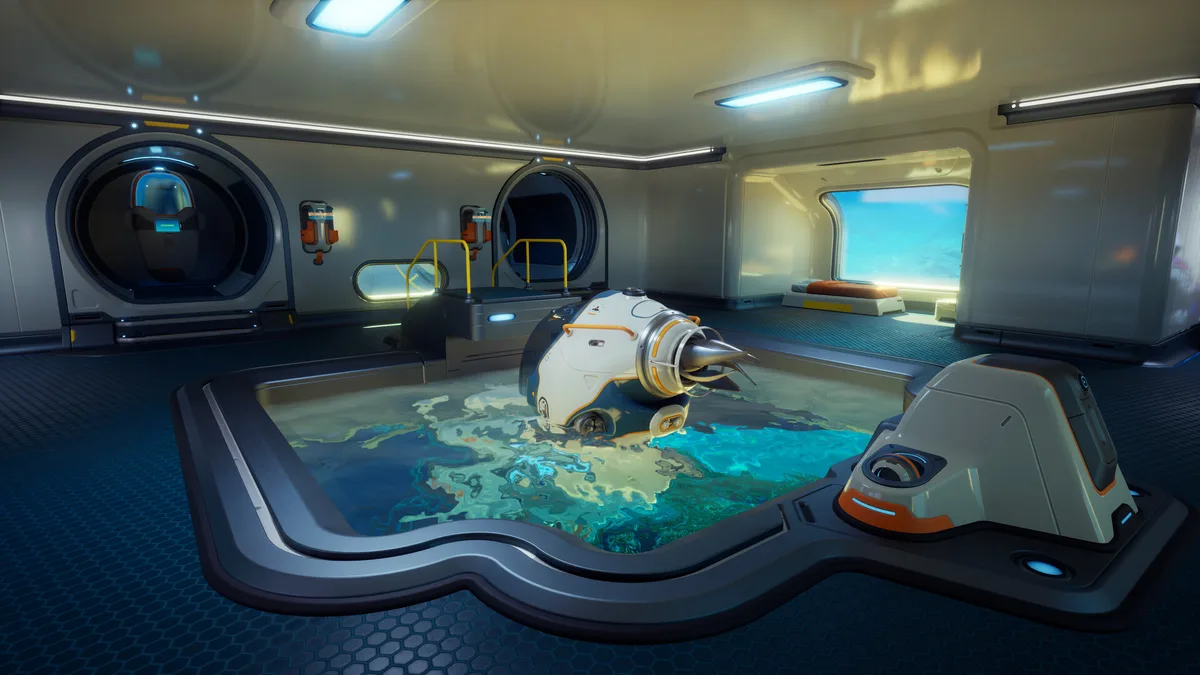 Caption: A mid-game Subnautica 2 base configuration in the Plateaus biome: the staging point before committing to deep Root Canyon operations.
Subnautica 2 deep-sea base: power management
Power is the system that breaks bases quietly. A power display that looks empty is often a connection problem before it is a construction problem, especially after moving a generator or loading a save.
Solar Panels are useful when the site has sky exposure. Hydroelectric Turbines need a current, and official hotfix notes specifically address turbines stopping after the player swims away. Power Transmitters let you route a source to a distant base, but the endpoint needs to snap directly to the base. Check the visible beam and the base display before replacing a working generator.
Power Storage smooths the difference between generation and a busy co-op base. In a four-player session, plan enough headroom for simultaneous fabrication and scanning, then test the network at the actual site. A backup source is more useful than a copied biome rule because the current Early Access build is still changing its power behavior through hotfixes.
GODEEPER: Power efficiency depends heavily on which biome your base sits in. The Subnautica 2 biomes guide covers depth ranges, threat profiles, and terrain characteristics for each zone: pick your build site based on both power access and creature pressure.
Subnautica 2 deep-sea base: what depth rules are confirmed
Older Subnautica guides often assume a hull-integrity meter, reinforced hull tiers, and exact depth bands. I could not verify those rules in Unknown Worlds' current Subnautica 2 store copy or official Steam hotfix notes. The current official material is specific about power, base placement, storage, and co-op, but it does not publish the 0-250m, 364-750m, or cumulative integrity values repeated in this article's earlier version.
That means the safe deep-base habit is different: do not spend resources on a claimed reinforcement tier until the live build shows the recipe and the warning. Test a small room at the planned site, confirm it can be placed, and watch the actual base status panel. If the game changes its structure rules, the in-game builder and the official patch notes are the source of truth.
Use this checklist before committing to a remote site:
- Confirm the modules you intend to build are currently available in the builder
- Check power generation, storage, and transmitter endpoints in the actual terrain
- Leave a clear exit route and room for a Tadpole or other vehicle approach
- Record the site and build version if a placement or power bug appears
This is less dramatic than quoting a depth limit, but it is more reliable for an Early Access guide whose base systems are still receiving fixes.
Module adjacency and layout efficiency
The basic guide covers module priority, what to build first. Layout, where to build things relative to each other, is a different problem, and it's where deep bases diverge most from beginner builds.
Subnautica 2 layouts reward functional clustering for human reasons: storage near fabrication shortens trips, a scanner near the entrance is easier to check, and a co-op crew can find the shared power display quickly. The official sources do not document a power discount, fabrication-speed bonus, or storage bonus from adjacency, so do not present those as hidden mechanics.
The official update history also matters here. A new storage base buildable was documented as not contributing to nearby crafting systems, which is a useful warning against assuming every storage object behaves like a connected crafting room. Build the compact cluster because it is easier to use, then test the actual inventory and power behavior in the current build.
For remote bases, leave space around the planned modules and keep the transmitter endpoint accessible. Placement improvements and base-object fixes are a recurring part of the Early Access notes, so a layout that works in one version may need a small rebuild after a hotfix.
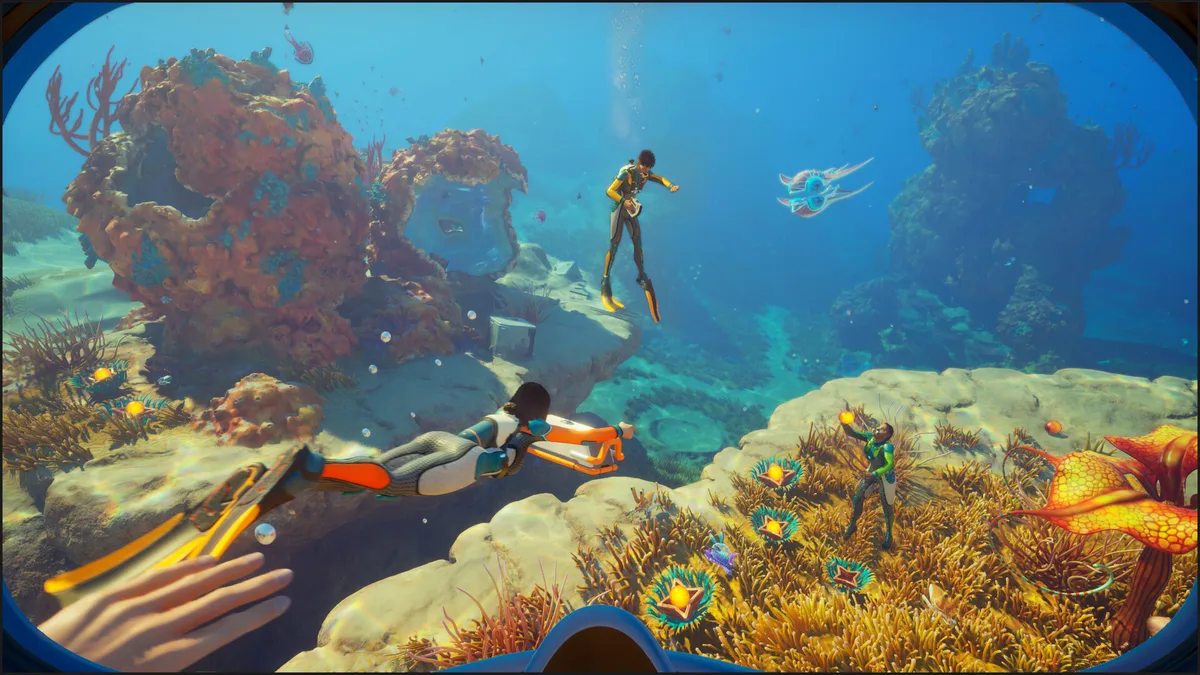 Caption: A deeper ocean site where power routing and safe module placement matter more than an inherited depth-tier rule.
GODEEPER: A Scanner Room at each forward base can cut down the travel time spent locating deposits in unfamiliar biomes. Subnautica 2 Scanner Room: Build Order and Upgrades →
Step-by-step: a flexible deep-sea base network
There is no official three-base requirement for Chapter 1. Use this sequence when a single base starts creating too much travel or power friction, and stop after the smallest useful expansion.
1. Stabilize the main base: Keep the first base compact, place storage near fabrication for convenience, and confirm that its power display changes when a generator or transmitter is added. Do not rebuild around an unverified hull-depth number.
2. Scout the next site: Pick a forward site based on resource access, safe vehicle approach, current or sky exposure, and a clear exit. Put down a small footprint first and test the modules you actually need before spending materials on a large room chain.
3. Add a forward base only if it saves time: A small storage and fabrication stop can be worthwhile when the return trip is long. It is optional, and it should not become a second power problem. Use a local source or a tested Power Transmitter connection.
4. Connect and test the power route: If generation is away from the base, place intermediate transmitters and snap the endpoint directly to the base. Confirm the beam and the base power display, then save and reload before trusting the route in a co-op session.
5. Keep a landmark and exit plan: The Reaper Leviathan Statue blueprint was given to players as a thank-you for the five-million-wishlist milestone, so it makes a useful decoration or base marker. Leave a clear vehicle route and write down the biome and build version for any remote site.
The vehicle is the travel layer between bases, but it does not replace a power test. A reachable base that loses its transmitter connection after a reload is still a bad staging point.
Tips for Subnautica 2 deep-sea base operations
Pin the power display to your routine. Check generation, storage, and the transmitter endpoint before a long expedition or co-op build session. A visible connection bug is easier to fix at the start than after a full inventory run.
Build the source that matches the site. Use Solar Panels where the sky is useful and Hydroelectric Turbines where a current is available. Keep Power Storage or another tested backup source for night cycles and busy sessions.
Test before expanding outward. Place one room, one storage object, and the required power route before committing to a large base. Early Access placement and power fixes can change the best layout, so a small test saves a large teardown.
Name your bases before you have three of them. The game may not support in-game labeling. Agree on names before confusion sets in. "Main," "Forward," and a biome name work. Without them, "go back to base" becomes ambiguous at the worst possible time.
Scout creatures before committing a build site. The Subnautica 2 DNA modification system makes nearby fauna relevant to route planning. If a site is on a dangerous patrol path, move the base before you have spent materials on a full module chain.
Frequently Asked Questions
What is the depth limit for basic hull sections in Subnautica 2? The current official sources do not establish an exact depth limit or the reinforced-hull rules described in older guides. Check the live builder and the latest Unknown Worlds notes instead of relying on the 0-250m or 364-750m figures.
Which power source is best for a deep-sea base in Subnautica 2? Use Solar Panels where sky exposure is useful and Hydroelectric Turbines where a current is available. Route a distant source with Power Transmitters and keep Power Storage or a backup source for busy sessions. The current official notes do not establish a universal thermal requirement for a named biome.
How do I stop my Subnautica 2 base from flooding? I could not verify an official hull-integrity meter or reinforcement rule in the current Subnautica 2 documentation. If a base behaves incorrectly, check placement, power connections, and the latest hotfix notes first, then report the issue with the build version and save.
What is module adjacency in Subnautica 2 base building? There is no official adjacency bonus table in the current sources. Group storage and fabrication because it is convenient, but do not promise power reductions, faster output, or extra capacity from a specific neighbor combination.
How many bases should I have in Subnautica 2 Chapter 1? There is no official required number. One well-placed base can be enough for a solo route; a second staging base can shorten trips when a biome or power source is far away. Choose sites by commute, safe placement, resource access, and whether you can connect or supply their power.
Can Leviathans destroy my base in Subnautica 2? Unknown Worlds has not confirmed base destruction mechanics in the Early Access build. Leviathans in the current Chapter 1 represent patrol-zone threats rather than active base attackers. The practical danger is building inside a patrol route and having every base approach turn into a hostile encounter rather than direct base destruction.
How does co-op affect power consumption in Subnautica 2? Subnautica 2 supports four-player co-op and shares base infrastructure, so plan generation and storage for simultaneous use. Check the power display before a long fabrication session, keep a backup source available, and make sure transmitters are snapped to the base. Solar production also depends on the light cycle, so do not treat it as a constant source.
Related Reading
- Subnautica 2 Base Building Guide: First-base placement, module priorities, and early-game setup before tackling the advanced systems covered here.
- Subnautica 2 Resources Guide: Biome-by-biome node density and why Root Canyon yields upper-tier materials unavailable elsewhere.
- Subnautica 2 Biomes Guide: Depth ranges, terrain maps, and threat profiles for scouting base 2 and base 3 sites before building.
- Subnautica 2 DNA Modification Guide: Why creature scanning near your Root Canyon base should influence where you place a forward base.
- Subnautica 2 Complete Guide Hub: Index of all Subnautica 2 guides covering survival, vehicles, co-op, and progression.
- Subnautica 2 Tips: First Steps, Base Building, and Co-op: Subnautica 2 tips for your first hours of Early Access: no-map navigation, when to build.
- Subnautica 2 Beginner Guide: Systems, Survival, First Hours: Subnautica 2 beginner guide: oxygen, DNA modification, food, base timing, and the 5 mistakes new.
- Subnautica 2 Oxygen Guide: Dive Planning and Survival: Subnautica 2 oxygen management explained: tank upgrade path, when to turn back, depth zones, Tadpole.
- Subnautica 2 Leviathan Guide: Avoid, Scan, Survive: Subnautica 2 leviathan encounters: patrol patterns, safe scanning range for confirmed EA Leviathans.
References
- Subnautica 2 on Steam: Steam store page, system requirements, Early Access updates
- Subnautica 2 official Steam news: official Early Access hotfixes for Power Transmitters, Hydroelectric Turbines, storage, and base placement
- Unknown Worlds Entertainment: 5 Million Wishlists Thank You Post: source for the Reaper Leviathan Statue blueprint
- Unknown Worlds: Launch Week Reaper Statue: launch-week statue availability and decoration details
- Subnautica 2 Base Building Guide: Location and Setup: foundation guide covering first-base placement and module priorities
- Subnautica 2 Resources Guide: biome-by-biome resource farming including Root Canyon upper-tier materials
- Subnautica 2 DNA Modification Guide: scanning system and why deep-biome fauna unlocks the best modifications
- Subnautica 2 complete guide hub: survival, biomes, base building, DNA mods, and all cluster guides
Was this guide helpful?
About the author

Senior Critic & Analyst
Former game data analyst turned critic with 11 years covering indie and mid-tier games. Based in Austin. Runs spreadsheets on games most people just play.
- 11 years games criticism
- Former game economy analyst
- Roguelike and strategy specialist
Keep reading


Disclaimer
This article is published for informational and entertainment purposes. It does not constitute professional financial, legal, or technical advice. Game performance, online services, patch schedules, and store listings change. Verify critical details (pricing, system requirements, regional availability) with publishers and storefronts before you buy. Affiliate links, where present, help support our editorial work and are labelled in our affiliate disclosure.
Comments
Loading comments…